1
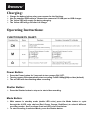
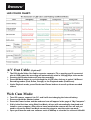
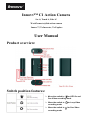
Charging: Charge the battery before using your camera for the first time. Use the supplied USB cable to connect the camera to PC USB port or USB charger. The Yellow LED will remain On during charging. The Yellow LED will go Off after full charge. Operating Instructions: FUNCTION KEYS CHART: Power Button: Press the Power button for 3 seconds to turn camera ON / OFF. Turning camera ON automatically start recording FullHD 1080p@30fps video (default). The red LED will slow flashing when recording. Shutter Button: Press the Shutter button to stop or to start video recording. Mode Button: With camera in standby mode (stable LED color) press the Mode button to cycle through the 4 LED color choices (Red, Green, Orange, Red/Green) to select 4 different recording modes. See Functions chart and LED color chart below. To start recording in selected Mode, press the Shutter button.