1
Home Gateway Wireless on your magnet home gateway
The Magnet Home Gateway has the latest wireless N technology so you
can connect wirelessly at the highest speeds available.
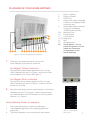
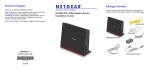
The Network Name and Wireless key are printed on the rear of your
Home Gateway, see Figure 4 below.
Figure 4 – WiFi Label, located on the back of the Home Gateway
You can connect to your Home Gateway
using Wireless in 2 ways:
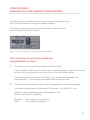
1. You can connect using Wireless Protected Set-Up (WPS).
This is the latest in WiFi security; some newer operating systems support this function and you will be prompted to push the button on the router during set up.
For more information on how to use WPS on your Home Gateway please visit:
www.magnet.ie - full user guide is available under the support tab.
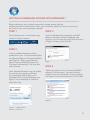
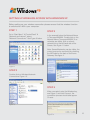
2. You can connect manually using the step by step guides on the following pages:
We have provided guides for Windows XP, Windows 7 and Mac OS X Lion.
Guides for other operating systems are available on the
relevant manufacturer’s websites:
Microsoft: http://support.microsoft.com/
Apple:
http://apple.com/support/
2