1
setting up wireless access with windows xp
Before setting up your wireless connection please ensure that the wireless function
is switched on within your computer.
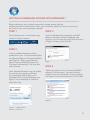
step 1
Go to “Start Menu” › “Control Panel” ›
“Network and Internet”, select
"Network Connections”. See Figure 9 below.
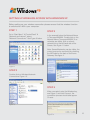
step 3
In the example below the Network Name
is ThompsonXXXXXX. Double click on the
Network Name ThompsonXXXXXX. If no
networks are visible, click on refresh
network list on the left hand side of the
Screen, See Figure 11 below
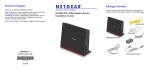
Note: Several Networks may be visible; the
correct one can be confirmed by checking
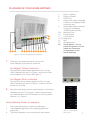
the WiFi label on the back of the Home
Gateway. See figure 4.
Figure 9
step 2
Double click on Wireless Network
Connections Figure 10.
Figure 11
step 4
When prompted, enter the Wireless key,
see Figure 4, and click Connect, the
connection process should take approx
30 secs.
Figure 10
Figure 12
4