1
14. TROUBLESHOOTING
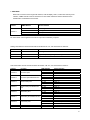
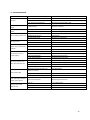
Fault
Reasons
Solution
Fuse defective
REPLACE fuse
Four foot switch bad
REPLACE switch
Power socket not connected well
REPLACE power socket /power cable
12 PIN wire faulty
REPLACE 12 PIN wire
LCD Display no light,no
LCD Display faulty
REPLACE LCD Display
display
Red/black wire didn’t connect into 5V
Connect into 5V and turn on power
12V fan faulty
REPLACE fan
Something stuck in the fan
Remove debris
12V power supply faulty
REPLACE 12V power supply
Not under sound control mode
Adjust to sound control mode
Sound knob adjust at MIN
Adjust sound knob at center place
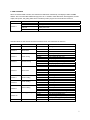
Motor not working, or
12V power supply faulty
REPLACE 12V power supply
rotation slow, but other parts
Motor driver IC faulty
REPLACE 2803
work well
Main IC faulty
REPLACE main IC(STC11F60XE)
Optical scanner faulty
REPLACE optical scanner
X/Y axis doesn’t move or
±15V power supply faulty
REPLACE±15V power supply
scanner jumping
Signal switch board faulty
REPLACE signal switch board
Scanner main board faulty
REPLACE scanner main board
DC motor faulty
REPLACE DC motor
Power supply faulty
REPLACE ±5V power supply
Transformer faulty
REPLACE transformer
DC motor driving board faulty
REPLACE driving board fault
DMX address for laser not equal to the
Reset DMX address
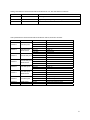
No power
LCD Display has light, no
display
Fan not working, other is fine
No sound control
DC motor no rotation or no
gobo, other parts work well
Cannot control DMX
Under ILDA mode, animation
is faulty, others are fine
No light or light is dark,
others are fine
address for controller
Analog switch IC faulty
REPLACE IC(DJ413)
Main IC faulty
Main IC(STC11F60XE)
Signal switch board faulty
REPLACE signal switch board
Power off
Turn on power supply
Mirror dirty
Clean the mirror
Laser diode faulty
REPLACE laser diode
12