1
Real World Analysis Examples
77
Even if you only do two versions of the page, you should limit the number of elements that you've changed on
the page.
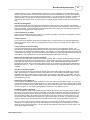
Use cookies or parameters to serve versions evenly
There are two methods of identifying a page version that ClickTracks can deal with: the cookie method or the
parameter method. With the cookie method, a cookie is set with a randomly selected value that identifies which
version of the page a visitor should see. Once set, that visitor will always see the same version of the page.
With the parameter method, a parameter is passed into the page with a randomly selected value. In this case,
the same visitor may see different versions of the page. We recommend the cookie method, which this tutorial
covers.
To set your cookie, you will use some kind of scripting language, either server-side (PHP, ASP, JSP, etc) or
client-side (JavaScript). The basic logic is:
If they already have the A/B Split cookie set, base the page on the value of the cookie. If they don't have the
cookie, randomly select a value for it and drop the cookie, then base the page on that value. This example is
from our Bobsfruitsite demo site and shows how to choose a different stylesheet depending on the AB test
cookie. There are 2 stylesheets that would be created and named 'fruitsite.css' and 'fruitsite2.css'
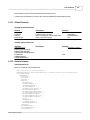
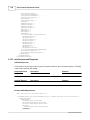
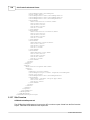
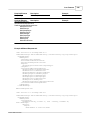
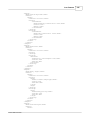
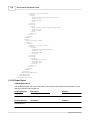
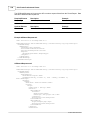
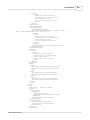
SAMPLE CODE (PHP)
=========================================================================
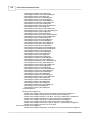
$absplit = $_COOKIE['ABSPLIT'];
$cookie_values = array(
"A" => "fruitsite",
values
"B" => "fruitsite2"
associated with them
);
if ($absplit != "") {
$stylesheet = $cookie_values[$absplit];
} else {
$new_cookie = array_rand($cookie_values);
setcookie("ABSLIT", "$new_cookie");
$stylesheet = $cookie_values[$new_cookie];
}
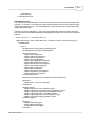
already have the cookie
// Register the cookie variable
// Set up an array of possible cookie
// and the filenames of stylesheets
// If the cookie is set
// base the stylesheet on the value of the cookie
// If the cookie hasn't been set
// Choose one of the keys at random, (i.e. A or B)
// Write that key into the cookie
// Show the stylesheet associated with that key
// Next time they load this page, they'll
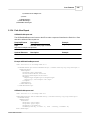
<link rel="stylesheet" type="text/css" href="<?PHP print $stylesheet ;?>.css">
above, choose the stylesheet and generate the name for it in the HTML
// Based on the cookie
END SAMPLE CODE (PHP)
===========================================================================
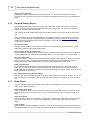
Regardless of the scripting language you use, the logic will basically be the same. Of course, this is just one of
many possible variations that you may want to implement. There are endless possibilities. You may choose to
use the A/B spit value to:
* vary the stylesheet and thereby the look and feel of the site, as above
* include a block of code (e.g. special offer) or not
* use a different template and thereby have a completely different layout
* make a link go to one place or another
* etc.
And you are not limited to only two choices either. ClickTracks' A/B Split report can distinguish between any
number of possible values of the cookie or parameter.
You can add more logic to your script to control it in any way you choose. For example, you might want to add
some logic to ensure that there is an exactly equal number of group A and group B, (though randomly selecting
will result in a roughly equal number given enough traffic). But the point is, whatever logic you choose to use is
up to you. It may be simple, like the one above, or quite elaborate. But ultimately, you should have a cookie in
© 2001-2008 ClickTracks