1
2.5
Configuring I/O Memory in the CPU
After the module has been inserted into the I/O base, you must register the
I/O addresses for each module in the CPU memory. (The module does not
automatically register addresses in the CPU when it is inserted.) This is
important because even though the module may appear to be operating
correctly, it will not communicate with the CPU unless the module is
configured in the I/O map. A programming device must be connected to the
CPU to configure the I/O map and verify CPU- to-module communications.
Apply power to the base and follow these steps to configure the I/O memory
map.
1.
Access the Configure I/O function menu.
2.
Select the appropriate channel and base number.
3.
Execute the Read Base function.
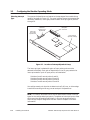
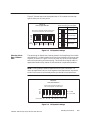
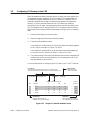
If the module is configured for non-interrupt mode, the module appears
as 16 X inputs, as shown in Figure 2-11, slot 1.
If the module is configured for interrupt mode, the module appears as
24 X inputs and 8 Y outputs, as shown in Figure 2-11, slot 2.
4.
You need to assign the starting I/O address and write the completed I/O
configuration to the controller memory. (In the example for slot 2, the
starting address is set for 0017.)
For more information on configuring the I/O, refer to your TISOFT manual.
I/O Address
Non-interrupt mode: the module logs in as 16 inputs (Xs).
Interrupt mode: the module logs in as 24 Xs and 8 outputs (Ys).
I/O MODULE DEFINITION FOR :
I/O
Slot
CHANNEL 1
Base Number
Displays number
of the current base.
BASE 00
Number of Bit and Word I/O
Special
Address
X
Y
WX
WY
1
..... 0001
..... 16
.. 00
.. 00
.. 00
.......
No
2
..... 0017
..... 24
.. 08
.. 00
.. 00
.......
No
3
..... 0000
..... 00
.. 00
.. 00
.. 00
.......
No
4
..... 0000
..... 00
.. 00
.. 00
.. 00
.......
No
Slot Number
Install the module into any
available I/O slot in the I/O base.
Function
SF Module
The Interrupt Input module is
not a Special Function Module.
Figure 2-11 Sample I/O Module Definition Chart
2-14
Installing the Module
SIMATIC 505 Interrupt Input Module User Manual