1
MODEL 2180 SERIES PRINTER
OPERATION AND MAINTENANCE
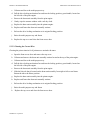
the procedure defined below to install the cartridge.
a. Remove the toner cartridge from its packaging. Gently rock it from side to side five or six
times.
Caution
To prevent damage, do not expose the cartridge to
light for more than a few minutes.
b. Remove the protective cover from the toner cartridge.
c. Install the toner cartridge into the drum unit.
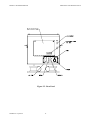
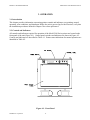
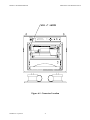
d. Open the front door of the printer and remove the top cover.
e. Unfasten and remove the drum unit assembly retainer located on the top of the print engine.
f. Pull the drive locking mechanism forward into the locking position, green handle, located on
the left side of the print engine.
g. Unfasten and lower the multi-purpose tray.
h. Insert the drum unit assembly into the print-engine.
i. Release the drive locking mechanism to its original locking position.
j. Raise the multi-purpose tray and fasten.
k. Replace and fasten the drum unit assembly retainer located on the top of the print engine.
l. Replace the top cover and close the front access door.
DataMetrics Corporation
8