1
Appendix A
Troubleshooting
I
n the event you encounter a problem using your Black Box modem, refer to the troubleshooting information in this
appendix. To troubleshoot the power supply and backplane on the modem cage or modem rack, refer to the
documentation that came with your modem cage or modem rack.
,
IMPORTANT
If you encounter a problem with your modem, be sure the modem switches are set to the appropriate
positions. If a switch is halfway between an on and off setting, the modem will not operate properly.
Problem Solving
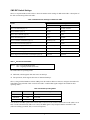
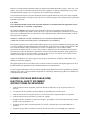
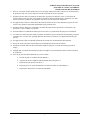
Table A-1 offers troubleshooting solutions for modem problems.
Table A-1. Troubleshooting Suggestions
If…
Perform These Procedures…
Modem does not respond and all LEDs
are off.
Check the modem cage or modem rack power supply module(s).
Modem does not receive data, and the
DCD and RxD LEDs are off.
The receive line pair may be disconnected from the modem. Make sure the
transmission line connection to the rear panel of the modem cage or modem rack
is accurate and secure.
The receive signal level may be below the CD threshold. Set SW1-5 ON to see
whether configuring the modem for a −43 dBm threshold resolves the problem.
The RTS, CTS, and TxD LEDs do not
blink.
The attached terminal or DTE may not be sending data to the modem. Verify that
data is being transmitted. If data is being transmitted, make sure the RS-232
cable is sound and securely connected to the modem and terminal or DTE.
Page 21