1
Set Up The Camera
Getting your camera ready to record takes just a few simple steps.
1) Open the back door of the camera by sliding the lock switch to the left and then
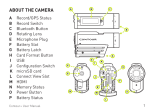
sliding the whole door up. When the white dot is exposed on the lock switch [K],
the door is locked.
2) Insert the battery until the red clip [E] snaps in to place. The end of the
battery with the metal squares goes in first, with the squares toward the top.
3) The 2GB microSD card should come pre-formatted and inserted in the camera
already. If it is not, insert the microSD card in to the camera [I]. The side with the
contacts should be facing to the right and the “jagged” edge of the card should be
facing up.
4) Close the back door and slide the lock switch [K] to the right until you feel a
click and the white dot is no longer showing.
5) Firmly press and immediately release the power button to turn the camera on.
After about one second, the lasers will activate, LEDs will flash, and you’ll hear
a single beep. After a moment, the lasers and the two lights on the back door
will go out. The Record/GPS status light on the lower front of the camera will
turn green and flash while the camera’s GPS module attempts to obtain a GPS
position fix.
At this point, your camera is ready to record video and audio.
What Is Your Camera Telling You?
The ContourGPS has three different LED lights in addition to the sighting lasers
that tell you about the status of your camera.
The two sighting lasers (located on either side of the lens) are there to help you
align your camera so you get the shot. The lasers come on when you first turn
your camera on, and will go out automatically after a few moments. You can reactivate the lasers when the camera is powered up by firmly pressing and quickly
releasing the power button.
The LED on the lower front of the camera [A] indicates record status (green for
standby, red for recording) and GPS position fix status (flashing when searching
for a position fix and solid once a position fix is obtained).
The two LEDs on the back door of the camera display battery status [M] and
microSD card status [K]. The color of the LED indicates remaining capacity:
Green = 70% or more left
Orange = 70% to 20% left
Red = Less than 20% left