1
PS Engineering
PMA8000B-MP3 Audio Selector Panel and Intercom System
Installation and Operator’s Manual
The audio from the Marker Beacon Receiver can be heard by selecting the "MKR" push-button switch. To
adjust the volume level, there is a service adjustment located on the top of the unit.
A pushbutton is used to set the receiver sensitivity and to test the indicator lamps mute the marker au dio.
Use "HI" sensitivity initially. This allows you to hear the outer marker beacon about a mile out. Then
touch the smaller MKR button to switch into Low Sensitivity mode. “LO” sensitivity gives you a more
accurate location of the Outer Marker. Holding the MKR button for one second activates marker test
lamp, labeled "T/M" and illuminates all three lamps simultaneously to assure the lamps (internal and e xternal) are in working order. TST does not activate MM autopilot sense output. Releasing the button r eturns to the last sensitivity.
Pressing the marker mode select (“T/M”) for one second will also cause the marker audio to mute for that
beacon. The next beacon received will re-activate the audio.
3.7
3.7.1
Intercom Operation
IntelliVox® VOX-Squelch
No adjustment of the IntelliVox® squelch control is necessary. There is no field adjustment. Through
three individual signal processors, the ambient noise appearing in all six microphones is constantly being
sampled. Non-voice signals are blocked. When someone speaks, only their microphone circuit opens,
placing their voice on the intercom.
The system is designed to block continuous tones; therefore people humming or whistling in mon otone
may be blocked after a few moments.
For consistent performance, any headset microphone must be placed within ¼-inch of your lips, preferably against them. (ref: RTCA/DO-214, 1.3.1.1 (a)).
NOTE
It is also a good idea to keep the microphone out of a direct wind path. Moving your head through a vent
air stream may cause the IntelliVox® to open momentarily. This is normal.
The IntelliVox® is designed to work with normal aircraft cabin noise levels (70 dB and above). It loves
airplane noise! Therefore, it may not recognize speech and clip syllables in a quiet cabin, such as in the
hangar, or without the engine running. This is normal.
For optimum microphone performance, PS Engineering recommends installation of a Microphone Muff
Kit from Oregon Aero (1-800-888-6910). This will not only optimize VOX performance, but will improve
the overall clarity of all your communications.
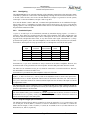
Table 3-1 Mic Muff ™ Part Numbers
Manufacturer
Bose
David Clark
Lightspeed
Model
Dynamic
Electret
M87 Dynamic
H10-30
H10-20, H10-40
H10-13.4
All
Peltor
7003
7004
90010
90015
Pilot
11-20 & 11-90
90015
Sennheiser
Telex
3.7.2
Mic Muff™ Part Number
90010
90015
90020
90010
90015
90015
90015
90015
Airman 750, Echelon
AIR3000
90015
90010
Intercom Volume Control (7)
The inner volume control knob adjusts the loudness of the intercom for the pilot and copilot. It has no
effect on selected radio levels, music input levels or passengers' volume level.
200-890-0403
Page 3-4
Rev. 4, Jan. 2011