1
Enhancing your system
DK-A1
DK-A1BK
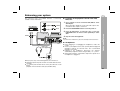
Listening to the playback sounds from VCR,
DVD, etc.
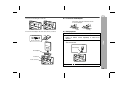
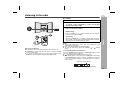
The connection cord is not included. Purchase a commercially
available cord as shown below.
1
White
To the line output jacks
White
Red
2
3
Press the ON/STAND-BY button to turn the power on.
4
Play the connected equipment.
Press the AUX button on main unit once or press the
FUNCTION button on remote control repeatedly to select
AUX.
Note:
To prevent noise interference, place the unit away from the television.
Headphones
RCA cord
(not supplied)
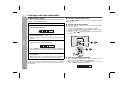
Before plugging in or unplugging the headphones, reduce the
volume.
Be sure your headphones have a 1/8" (3.5 mm) diameter plug and
impedance between 16 and 50 ohms. The recommended
impedance is 32 ohms.
Plugging in the headphones disconnects the speakers
automatically. Adjust the volume using the VOL (+ or –) control.
During alarm activation, sound will be output to the speaker even
if headphones is plugged in.
Advanced Features
When using video equipment, connect the audio output to this
unit and the video output to a television.
VCR, DVD, etc.
Red
Use a connection cord to connect the VCR, DVD etc. to the
AUX IN jacks.
Auto power on function:
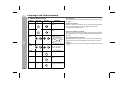
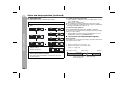
When you press any of the following buttons, the unit turns on.
AUX button (main unit): The unit turns on and the AUX function is
activated.
/ button (main unit and remote control): The unit turns on and
playback of the last function starts (iPod, TUNER, AUX).
21