1
About the AgaMatrix Presto Meter
About the AgaMatrix Presto Meter Display Segments
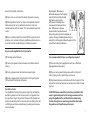
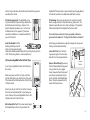
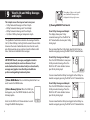
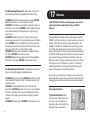
(1) Display: Glucose test results, symbols, messages and
graphs appear here.
1
(2) CENTER Button: Use the CENTER button to confirm an
option or make a selection in a menu.
2
(3) RIGHT Arrow Button: Use the RIGHT arrow button to
scroll forward through options.
4
5
(4) Test Strip Port: Insert the AgaMatrix Presto Test Strip,
with the contact bars facing up, into the test strip port.
(5) LEFT Arrow Button: Use the LEFT arrow button to scroll
backward through options.
3
7
6
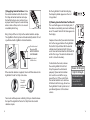
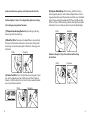
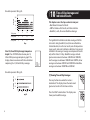
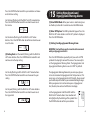
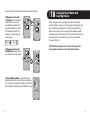
(1) Date and Time: Appears here, including when the meter
is deactivated.
(2) Glucose Test Results
2
(3) Low Battery: Appears when the batteries in your meter
are running low.
1
(4) Temperature Symbol: Appears when the meter is
outside its operating temperature range of 50 °F to 104 °F
(10 °C to 40 °C ).
5
3
4
(5) Ketone Symbol: Appears when your glucose test results
are higher than 240 mg/dL.
(6) Control Solution Symbol: Appears after you have performed a control solution test.
(7) Units of Measurement: Results will be displayed in
mg/dL.
10
11