1
DK-A10
DK-A10BK
•
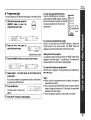
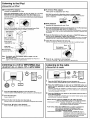
Programmed play
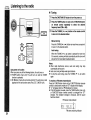
You can choose up to 32 selections for playback in the order you like.
1
While in the stop mode, press the
MEMORY button to enter the
programming save mode.
8
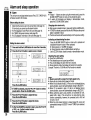
Press the ~ or ~ button to
select the desired track.
3
Press the MEMORY button to save the track number.
Selected track number
Repeat steps 2 - 4 for other tracks. Up to 32 tracks can be
programmed.
If you make a mistake, the programmed tracks can be cleared
by pressing the CLEAR button.
5
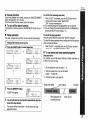
Press the - button.
The total number in memory will
appear.
6
'5ee§
@e8
eeee
@08@
~e::
e
CLEAR
To cancel the programmed play mode:
While in the stop mode and the "MEM" indicator is lit, press the
CLEAR button on the remote control. The "MEM" indicator will
disappear and all the programmed contents will be cleared.
2
4
To clear the programmed selections:
Press the CLEAR button on the remote
control while the "MEM" indicator is flashing.
Each time the button is pressed, one track will
be cleared, beginning with the last track
programmed.
Adding tracks to the program:
If a program has been previously stored, the "MEM" indicator will be
displayed. Then follow steps 1 - 6 to add tracks. The new tracks will
be stored after the last track of the original program.
To check which tracks are programmed:
While the unit is stopped in the programmed play mode, press the
~ or ~ button.
Notes:
• When a disc with programmed tracks is ejected, the program is
automatically canceled.
• Even if you press the ON/STAND-BY button to enter the stand-by
mode or change the function from CD to another, the programmed
selections will not be cleared.
• Durina the program operation, random play is not possible.
Press the ~ III button to start playback.
21