1
Chapter 8. General Settings
67
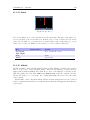
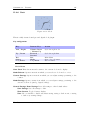
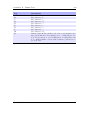
Peak Release. This determines how fast the bar shrinks when the music becomes
softer. Lower values make the peak meter look smoother. Expressed in scale
units per 10 ms.
Peak Hold Time. Specifies the time after which the peak indicator will reset. For
example, if you set this value to 5 s, the peak indicator displays the loudest
volume value that occurred within the last 5 seconds. Larger values are useful
if you want to find the peak level of a song, which might be of interest when
copying music from the player via the analogue output to some other recording
device.
Clip Hold Time. The number of seconds that the clipping indicator will be visible
after clipping is detected.
Clip Counter. Show the number of times the clip indicator went active during
recording in front of the peak meters.
Scale. Select whether the peak meter displays linear or logarithmic values. The
human ear perceives loudness on a logarithmic scale. If the Scale setting is
set to Logarithmic (dB) scale, the volume values are scaled logarithmically.
The volume meters of digital audio devices usually are scaled this way. On
the other hand, if you are interested in the power level that is applied to
your headphones you should choose Linear display. This setting cannot
be displayed in units like volts or watts because such units depend on your
headphones.
Minimum and maximum range. These two options define the full value range
that the peak meter displays. Recommended values for the Logarithmic
(dB) setting are -40 dB for minimum and 0 dB for maximum. Recommended
values for Linear display are 0 and 100%. Note that -40 dB is approximately 1% in linear value, but if you change the minimum setting in linear
mode slightly and then change to the dB scale, there will be a large change.
You can use these values for ‘zooming’ into the peak meter.
Default Codepage. A codepage describes the way extended characters that are not
available within the ASCII character set are encoded. ID3v1 tags do not have a
codepage encoding contained so Rockbox needs to know what encoding has been
used when generating these tags. This should be “ISO-8859-1” but to support languages outside Western Europe most applications use the setting of your operating
system instead. If your operating system uses a different codepage and you are
getting garbled extended characters you should adjust this settings. In most cases
sticking to “ISO-8859-1” would be sufficient.
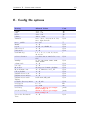
8.5. System
8.5.1. Battery
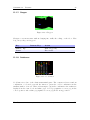
Options relating to the battery in the player.
The Rockbox manual
(version rUnversioned directory-150516)
Iaudio X5