1
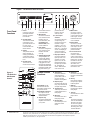
Figure 1 The Evolution 222 Front Panel
Front Panel
Functions
1 Power
Use this to switch the
preamplifier between
stand-by and operational modes.
2 Infrared emitter
This transmits infrared
commands to a programmable remote control, such as the
Universal Krell Touch
Screen Remote.
3 Display
This provides channel
status messages, including input selection,
volume level, balance
offset, and menu selections.
4 Infrared sensor
This receives commands from the remote
Figure 2
The Evolution
222 Remote
Control
control. Make sure this
is not obstructed.
5 Menu button
Use this to access the
menu functions of the
Evolution 222. For
more information, see
Customizing the
Evolution 222, in the
owner’s reference.
6 Enter button
Use this to configure the
menu functions of the
Evolution 222. See
menu (5).
8, 9, and 10 Input
selectors
Use these to select the
corresponding rear
panel input that is connected to a singleended (S-1, S-2, S-3),
balanced (B-1, B-2), or
CAST (C-1, C-2) analog
source. The display (3)
shows the selected
input and volume level.
7 Stand-by/Power LED
This preamplifier and
power supply LED illuminates red (stand-by)
when the Evolution 222
is plugged into a standard AC wall receptacle.
The LED illuminates blue
(operational mode) when
the power button (1) is
11 Tape input selector
Use this to select the
tape input that is connected to an analog
tape source. The red
LED illuminates when
the tape input is selected. The display (3)
shows: TAPE and the
main volume level.
Remote Control
Functions
B Amp Sel key
Use this to select the
meter range of the
power meter scale on
the front of a Krell
Evolution One amplifier.
Keys labeled 1 to 14
have the same function
(and callout number) as the
front panel controls.
Keys labeled A through J
are unique to the remote control, and are
described below:
A Amp Pwr key
Use this to activate Krell
amplifiers connected to
your system.
2
Krell Evolution 222
pressed while the
Evolution 222 is in
stand-by mode.
C Bal(ance) keys
Use along with the level
keys (14), to balance left
and right output levels.
D Transport keys
These keys are functional with all Krell CD and
DVD players.
E Menu key
Use this to enter CD or
DVD player menus.
F Direction keys
Use these keys to navigate CD and DVD
menus.
12 Mute button
Use this to mute the
preamplifier output. To
unmute, press the mute
button again. The red
LED illuminates when
mute is selected.
13 Phase button
Use this to invert the
absolute polarity of the
main output. The red
LED illuminates when
phase is selected.
14 Level control knob
Use this knob to
increase or decrease
system volume level or,
with the remote control’s
balance keys, to adjust
the balance. The level
control knob or keys
also select menu
options that customize
the Evolution 222.
G Select key
Use this to make selections from CD and DVD
menus.
H CD key
Press this to make the
transport keys operate
Krell CD players.
I
DVD key
Press this to make the
transport keys operate
DVD players.
J Title key
Use this with CD or DVD
player menus.
Note
The remote is shipped
with two AAA batteries
that have to be installed. Use the supplied
Torx wrench to remove
the battery panel, then
install the batteries.
This product is manufactured in the United States of America. Krell ® is a registered trademark of Krell Industries, Inc., and is
restricted for use by Krell Industries, Inc. its subsidiaries, and authorized agents. Krell Current Mode™ and Evolution CAST™ are
trademarks of Krell Industries, Inc. All other trademarks and trade names are registered to their respective companies.
© 2006 by Krell Industries, Inc., All rights reserved.