1
Recording CD text
tape or rental CD label with paste protruding from
the edge or when a disc has a trace of such a
sticky object, do not attempt to play the disc. The
disc may be impossible to take out, or another
malfunction may result.
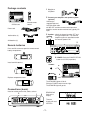
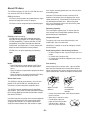
• Write only on the printed side of a CD-R or CD-RW
disc, and only with a soft felttipped pen.
• Do not attempt to record a
disc with a special shape.
• Do not attempt to play a disc
with a special shape such as
an octagonal or heart shaped
disc. Equipment malfunction
may result.
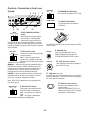
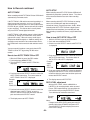
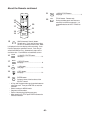
Before finalalization of a CD you can enter text information. Only the CD title and track titles can be entered.
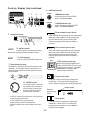
With your unfinalized disc in the CDR drive and stopped
CD Title
Titleofeachtrack
BASS
TREBLE
MID
TEXT
PHANTOM PROG
DISP
REC MODE SINGLE
REPEAT MENU/STORE
A-B
CANCEL/DELETE
CD RECORDER CDR300
PROFESSIONAL
SELECT
ERASE
CD text
FINALIZE
REC
POWER
STANDBY
PUSH ENTER
CD text, when present, provides text information such
as the CD title, artist, track titles, and track artists.
1
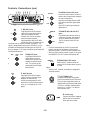
The CDR300 can record text information on an unfinalized CD-R or CD-RW disc that you record.
2
TEXT EDIT
CD text during playback
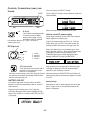
When a disc is inserted in the CDR drive the CDR300
automatically detects if a disc has text information and
automatically displays the CD title. The CDR300 can
display 14 characters, if the text information is longer
than that the text automatically scrolls from right to left.
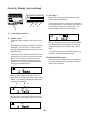
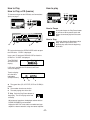
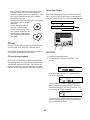
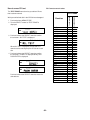
1 push and release Menu/Store.
2 Turn the SELECT control so TEXT EDIT is displayed.
L
dB-50
TOTAL TRACK
-30
-22
-16
-12
-8
-4
0
R
CD-R
CD-RW
Push and release the SELECT control to select.
CD TITLE is displayed.
L
dB-50
TOTAL TRACK
-30
-22
-16
-12
-8
-4
0
R
CD-R
CD-RW
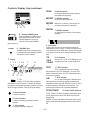
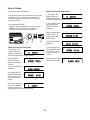
(Turn the SELECT control to select editing track
titles.) Push and release the SELECT control to
select editing the CD TITLE or the Track title. The
first character of the title is flashing.
L
dB-50
TOTAL TRACK
-30
-22
-16
-12
-8
-4
0
R
CD-R
CD-RW
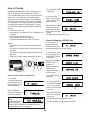
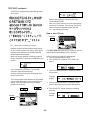
Turn the SELECT control to select the character,
or from the remote push and release alphanumeric
keys to select the character.
- 32 -