1
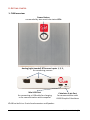
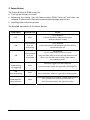
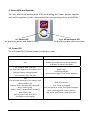
The data collection stops after the specified measurement time (time‐based mode) or specified number of samples (manual mode) has been reached. The Measurement LED remains green to show that measured data are stored in the CLAB’s permanent memory. These data will stay in this memory also when you turn CLAB off. Only new measurement settings will cause the data to disappear. Re‐connect CLAB to your Graphical Calculator or computer and retrieve the collected data into the ECON or Coach software. In a very rare situation it can happen that after the off‐line measurement is performed CLAB does not start anymore. This can be caused by a problem with reading the stored data from the CLAB’s memory. To force CLAB to start without reading the stored data press and hold the Power Button (3‐4 sec) until the left Power LED becomes green then release the button. 2. Using Coach with CLAB for the standalone mode A Coach Activity suitable for the CLAB standalone mode (off‐line measurement)6 has in its toolbar, next to the green Start button, two additional buttons, the Send Settings and Get Data buttons7. Such activity can be used as well as for on‐ line measurements (CLAB connected to the computer during the measurement, see Chapter IV) as for off‐line measurements to set up CLAB for remote data collection and to retrieve the collected data from its memory. By clicking the green Start button the on‐line measurement is started. By clicking the Send Settings button the Experiment settings (measurement settings and sensor information) are uploaded to CLAB. Then CLAB can be disconnected from the computer and remote measurements can be performed. After the measurement is finished, CLAB is reconnected to the computer. By clicking the Get Data button, the contact between CLAB and the computer is re‐established and the measurement results will be downloaded to Coach. Please notice that you need to be in the same Coach Activity. In the case there is no communication between Coach and CLAB right click the CLAB screen image and select Reset Hardware. 6 For off‐line measurements CLAB does not have to be connected to the computer during the measurement. The collected data are stored in the CLAB’s memory and have to be transferred to Coach afterwards. 7 To enrich a Coach Activity with the off‐line measurement mode, go to the menu option Options > Activity options and check the Off‐line checkbox. CLAB User’s Guide | 21