1
WIRELESS / REMOTE FLASH
On-camera
flash
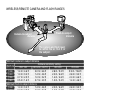
Wireless/Remote flash allows the camera to control
an off-camera Minolta 5600HS(D) and 3600HS(D)
flash unit without the need of a cable. Single or
multiple flash units can be placed around the subject
to create different lighting effects.
The camera’s built-in flash fires to control the offcamera flash units rather than to illuminate the
subject. See your local camera dealer about Minolta
lighting accessories.
Wireless/
Remote
flash
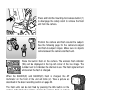
Slide the cap off the accessory shoe (p. 75).
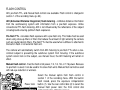
Slide the Minolta 5600HS(D) or 3600HS(D) flash on
the accessory shoe until the safety lock engages.
Turn on the camera and flash unit.
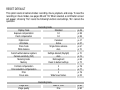
Image size
Quality
Flash mode
Flash control
AEL button
Reset
88
RECORDING
Fill-flash
Red eye
Rear sync.
Wireless
MENU
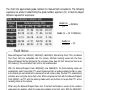
Set the camera to the wireless flash mode in section
1 of the recording menu (p. 80). This will
simultaneously set the flash to the wireless mode
and set the camera to the flash’s wireless channel.