1
108
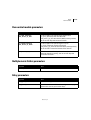
General parameters
This chapter provides an overview of the different parameters for the
Streaming Server. You can modify them to fit your needs.
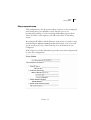
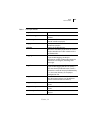
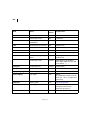
The following are general parameters, valid across all modules of the
server:
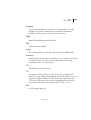
Keyword
Value
rtsp_port
Port(s) for accepting client connections
NOTE: Add port 80 to this list if you are
streaming across the Internet and want clients
behind firewalls to be able to connect to the
streaming server.
default_authorization_realm
The text to display as the login entity "realm"
in the client is defined by
default_authorization_realm. If the default
realm is not defined here, then the default
realm is set to "Streaming Server". The realm
used in a response can also be dynamically set
by authorizing modules.
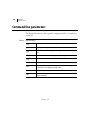
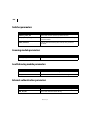
do_report_http_connection_ip_address
When behind a DNS round robin, the client
needs to be told the specific IP address of the
server handling its request. This preference
tells the server to report its IP address in the
reply to the HTTP GET request when tunneling
RTSP through HTTP.
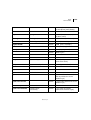
tcp_seconds_to_buffer
The "scaling factor" to appropriately scale the
buffer size.
Using the bitrate of the movie as a guide, the
server will set the TCP send buffer to fit this
number of seconds of data.
max_tcp_buffer_size
Maximum size the send buffer can be set to.
Version 3.1