1
4.4.2
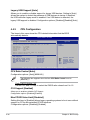
USB Configuration
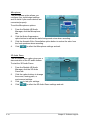
The items in this menu allows you to change the USB-related features. Select an
item then press <Enter> to display the configuration options.
Advanced
BIOS SETUP UTILITY
USB Configuration
Options
USB Devices Enabled:
None
USB Functions
USB 2.0 Controller
USB 2.0 Controller Mode
BIOS EHCI Hand-off
Port 64/60 Emulation
Legacy USB Support Disabled
Enhanced
[Enabled]
[Enabled]
[HiSpeed]
[Enabled]
[Disabled]
[Auto]
Select Screen
Select Item
Change Option
F1 General Help
F10 Save and Exit
ESC Exit
+-
v02.58 (C)Copyright 1985-2007, American Megatrends, Inc.
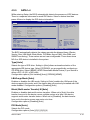
The USB Devices Enabled item shows auto-detected values. If no USB device
is detected, the item shows None.
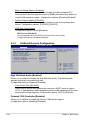
USB Functions [Enabled]
Allows you to enable or disable the USB functions. The following sub-items appear
when this item is set to [Enabled]. Configuration options: [Disabled] [Enabled]
USB 2.0 Controller [Enabled]
Allows you to enable or disable the USB 2.0 controller.
Configuration options: [Enabled] [Disabled]
USB 2.0 Controller Mode [HiSpeed]
Allows you to set the USB 2.0 controller mode to HiSpeed (480 Mbps) or
FullSpeed (12 Mbps). This item appears only when you enable the USB 2.0
Controller item. Configuration options: [FullSpeed ] [HiSpeed ]
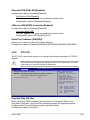
BIOS EHCI Hand-off [Enabled]
Allows you to enable support for operating systems without an EHCI hand‑off
feature. Configuration options: [Disabled] [Enabled]
Port 64/60 Emulation [Disabled]
Allows you to enable or disable the I/O port 60h/64h emulation support. This item
should be enabled for the complete USB keyboard legacy support for non-USB
aware OSes. Configuration options: [Disabled] [Enabled]
ASUS P5KR
4-21