1
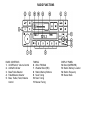
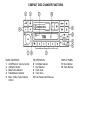
Station Memory Tuning: This radio
allows storing of up to six AM, FM
and weather band stations for
instant pushbutton tuning. First, tune
to a station using scan, seek, or
manual tuning. Next, depress and
hold one of the six numbered
station-memory buttons. The current
station stored in the selected
location will play. In approximately
two seconds a beep tone will be
heard through the speakers,
signaling that the new station
frequency is stored in the numbered
location you pressed. Each new
station-memory button can store
one AM, one FM and one weather
band station. The display will
indicate the storage location next to
the band selected in the left side of
the display.
Bass/Treble Control: To adjust
bass or treble response, press the
control button repeatedly
tone
until BASS or TREB appears in the
display. To increase treble or bass,
press the "+" button. To decrease,
press the "-" button. Horizontal bars
at the bottom of
the display indicate the amount of
adjustment plus or minus the center
(flat) point. To set bass or treble to
their flat settings, push the tone
button, then simultaneously press and
hold both the "-" and "+" buttons
momentarily (less than 4 seconds).
Please note that only the tone
settings for the current mode (AM,
FM, WB, Tape or CD) will be set to
flat. If you press and hold the "-" and
"+" buttons for at least 5 seconds,
both bass and treble (as well as fader
and balance) will automatically reach
the center point of their ranges and
RESET (CENTR) will appear in the
display. The volume level will also
return to a preset point.
Fader/Balance Control: To adjust
left-right speaker balance or front to
rear fader*, press the speaker button
repeatedly until FADER or BAL
appears on the display. Then press
either the "+" or "-" button to adjust
fader or balance. Horizontal bars at
the bottom of the display indicate the
amount of adjustment plus or minus
the center point.
To set fader or balance to their
center positions, push the
Fader/Balance selector, then
simultaneously press and hold both
the "-" and "+" button momentarily
(less than 4 seconds). The Fader
and Balance settings for all modes
will be set to their center positions. If
you press and hold the "-" and "+"
buttons for at least 5 seconds, leftright speaker balance, front to rear
fader (as well as bass and treble)
will automatically reach the center
point and RESET (CENTR) will
appear in the display. The volume
level will also return to a preset
point.
Antenna: The antenna extends
automatically whenever the radio is
switched on and retracts whenever
the radio or the vehicle's ignition is
switched off.
Be sure to switch the radio OFF
before entering a car wash to avoid
damage to the antenna mast.
*SL models do not have the FADER
function.