1
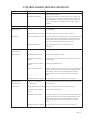
CONTROL BOARD TROUBLE SHOOTING
Power Problems
Indicator
Green LED Off
4 Alarm LED's blinking
LTS Low Temperature
Switch Lock-Out
Possible Cause
Reduced or no water flow
Solution
Check line voltage circuit breaker and disconnect. Check for 24
VAC between C1 and P1.
Check 24 VAC between C1 and P1. If there is no voltage, check
for primary power supply to transformer. If power supply is on,
replace transformer. If voltage is less than 19 VAC or more than
27 VAC, check main power supply for over or under voltage
conditions.
Solution
Check pump operation and/or valve settings; adjust to proper flow
rate per design.
Water temperature out of range Bring water temperature in loop to design conditions.
Bad Low Temperature Switch
Disconnect, then reconnect main power to reset any tripped safety
switches. If unit does not run, jumper the LTS terminals on the
control board. If unit runs while jumper is attached, replace the
LTS switch. If unit still does not run, replace board.
Wrong Dip Switch #7
Setting Set dip switch for correct safety NO or NC.
(See page 7.)
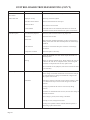
LPS Low Pressure
Switch Lock-Out
Loss of refrigerant charge
Check system pressures.
Orange LED ON
Water temperature too low
Increase water temperature in loop.
Low Water Flow (Heating
Mode)
Check pump operation and/or valve setting; adjust to proper flow
rate per design.
Inadequate air flow (Cooling
Mode)
Check air filter and duct work.
Bad Low Pressure Switch
Disconnect, then reconnect main power to reset any tripped safety
switches. If unit does not run, jumper the LPS terminals on the
control board. If the unit runs, while the jumper is attached,
replace the LPS switch. If the unit still does not run, replace
board.
Wrong Dip Switch #7 Setting
Set dip switch for correct safety NO or NC. (See page 7.)
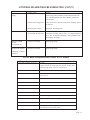
HPS High Pressure
Switch Lock-Out
Reduced or no water flow
(Cooling Mode)
Check pump operation and/or valve setting; adjust to proper flow
rate per design.
Green LED ON
Water temperature out of Range Bring water temperature in loop to design conditions.
Red LED ON
Inadequate air flow (Heating
Mode)
Check air filter and ductwork.
Bad High Pressure Switch
Disconnect, then reconnect main power to reset any tripped safety
switches. If unit does not run, jumper the HPS terminals on the
control board. If the unit runs, while the jumper is attached,
replace the HPS switch. If the unit still does not run, replace
board.
Wrong Dip Switch #7 Setting
Set dip switch for correct safety NO or NC. (See page 6.)
Page 9