1
AT C 3 2 U 0 2 C o m m u n i c a t i n g , P r o g r a m m a b l e T h e r m o s t a t - I O M
R e v. : 2 4 F e b . , 2 0 1 4
7.5
SMART HEAT STAGING
When there is auxiliary heating demand, Smart Heat Staging
defines the minimum amount of time to wait before activating
auxiliary heating. If you find that the thermostat is operating
auxiliary heating equipment too quickly/slowly, this setting
allows for adjustment to correct the temperature algorithm.
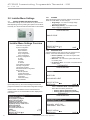
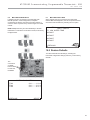
9.0 Service Mode
SERVICE MODE
MANUAL OPERATION
CONTROL DIAGNOSTICS
DIPSWITCH CONFIG
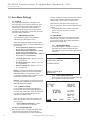
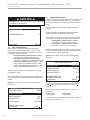
Adjust the Smart Heat Staging setting using the up/down
arrow buttons. Press the center button to save changes.
• Smart Heat Staging (default Off): options: OFF,
5 – 120 minutes (in 5 minute increments)
7.6
ELECTRIC HEAT LOCKOUT
Electric heat lockout keeps electric heat turned off if the
outdoor temperature is above the specified temperature so
as only to use electric heat when necessary.
Adjust the Electric Heat Lockout setting using the up/down
arrow buttons. Press the center button to save changes.
• Electric Heat Lockout (default Off): options:
OFF, 5 – 60°F (in 5°F increments)
NOTE: An outdoor temperature sensor must be installed for
this feature to work.
8.0 Demand Reduction Configuration
Demand Reduction is activated by an input signal at the unit
control board to reduce the electric load while peak utility
rates are high. The Demand Reduction Configuration mode
selects which of the available unit control inputs is to be
used as the activation signal. While a physical input signal is
present at the selected input, the thermostat will implement
load reduction by limiting operation or capacity. Refer to
section 5.6.9 in the user manual (part number 97B0055N02)
for more details on Demand Reduction.
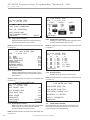
Adjust the Demand Reduction Configuration setting using
the up/down arrow buttons. Press the center button to save
changes.
• No Demand Reduction (default) – Demand
Reduction operating mode will not be activated by
a DXM2 input.
• DXM2 Inputs – Assigns a DXM2 input to activate
Demand Reduction operating mode.
INSTALLER SETTINGS
THERMOSTAT CONFIG
SYSTEM CONFIG
ACCESSORY CONFIG
INPUT DEALER INFO
HUMIDITY CONFIG
TEMPERATURE CONTROL
DEMAND REDUCTION CNFG
SERVICE MODE
SETPOINT LIMITS
RESTORE DEFAULTS
DXM2
ATC32U02
SELECT OPTION
PREVIOUS
12
FAULT HISTORY
CLEAR FAULT HISTORY
SELECT OPTION
PREVIOUS
SELECT
9.1
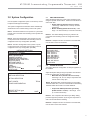
MANUAL OPERATION
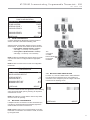
Manual Operation mode allows the service personnel to
manually command operation for any of the thermostat
outputs, blower speed, as well as pump speed or valve
position to help troubleshoot specific components.
NOTE 1: The ECM Airflow adjustment will not be present if the
connected communicating control (DXM2) is not configured for
ECM (section 3.3).
NOTE 2: The Pump Speed adjustment will not be present
if the connected communicating control (DXM2) is not
configured for Pump (section 3.3).
NOTE 3: The Valve Position adjustment will not be present if
the connected communicating control (DXM2) is configured for
Valve (section 3.1).
NOTE 4: If multiple units are connected to one thermostat,
refer to section 9.6
MANUAL OPERATING MODE
Y1
Y2
W
O
G
H
DH
ECM
PUMP
TEST
COMM OUTPUT
COMM OUTPUT
COMM OUTPUT
COMM OUTPUT
COMM OUTPUT
COMM OUTPUT
COMM OUTPUT
AIRFLOW
SPEED
MODE
SELECT OPTION
PREVIOUS
OFF
OFF
OFF
OFF
OFF
OFF
OFF
0
0%
OFF
SELECT
9.2
CONTROL DIAGNOSTICS
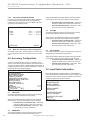
Control Diagnostics mode allows the service personnel to
view the status of all physical inputs, switches, temperature
sensor readings, as well as the operational status of the
pump at the thermostat.
3.3
C 1.0
Navigate between diagnostic screens using the left/right
arrow buttons.
Geothermal Heat Pump Systems