1
1
First-Time Set Up
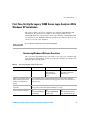
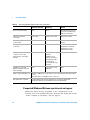
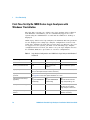
Table 2
Answering Windows Welcome Questions (continued)
Standalone (No LAN)
Workgroup
Domain
Enter your domain settings.
N/A
N/A
Enter the name/password of
a user who can add the logic
analyzer to the domain.
Checking your Internet
connectivity
Press 'Skip'
Wait for this to finish.
Wait for this to finish.
How will this computer connect
to the Internet?
N/A
N/A
Choose the appropriate
answer.
Setting up a high-speed
connection?
N/A
N/A
Enter either the fixed IP/DNS
assigned by your network
administrator or select
"Obtain Automatically".
(If LAN connected) Will this
computer connect to the
Internet directly, or through a
network?
N/A
Choose "Yes, through a
network"
(Agilent does not
support connecting to
the internet through a
modem directly
connected to the logic
analyzer.)
N/A
(If LAN is not connected)
Windows unable to determine
LAN connectivity.
N/A
You are told to set up
LAN later.
N/A
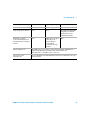
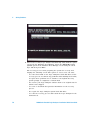
Ready to register with Microsoft
The legacy 16900 series of Logic Analysis systems have Windows XP already enabled
to run.
This registration is to allow Microsoft to contact you.
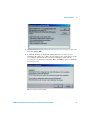
Who will use this computer?
For All: Entering names here lets multiple users use the logic analyzer with
administrator permissions. By default their passwords will be blank.
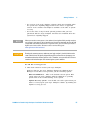
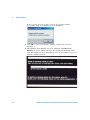
If expected Windows Welcome questions do not appear
During first- time power- up, depending on the configuration of your
network, some of the Windows Welcome questions that should appear, like
“Is this computer in a domain?”, may not appear.
16
16800 Series Portable Logic Analyzers Installation/Quick Start Guide