1
■
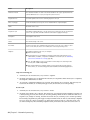
LimitDirs=/mnt.
Proxy Quality for RED Footage
The LowresDebayerMode parameter sets the proxy quality level for viewing RED (R3D) media. Legal values:
Full, Half Premium, Half Good, Quarter (default), Eighth.
Slave processes
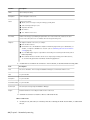
To improve real-time playback of RED media, Wiretap Gateway can spawn multiple slave processes that
increase performance without requiring additional licenses. This is set with NumLocalSlaves. The default
setting is 4.
NOTE Do not use slaves in conjunction with a RED ROCKET. Set NumLocalSlaves=0.
On a dedicated system, enable as many slave processes as the number of CPU cores on the system.
If you are running Creative Finishing workstation, make sure you set aside at least four CPU cores for a
Creative Finishing application, or two cores for Lustre. For example, on a 16-core HP Z800 running Lustre,
enable 12 slave processes, so that two CPU cores remain available for Lustre, and two other CPU cores are
available for background processes like Backburner.
Read-ahead threads
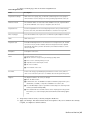
If using a RED ROCKET you can't make slaves available. The Wiretap server can handle concurrent reading
from multiple clients and the number of threads to create is set with NumReadAheadThreads. The default
value, 7, is tuned for two clients each reading (in parallel) two streams, each with three read-ahead requests.
If you cannot find this parameter in the configuration file, see
/usr/discreet/wiretapgateway/cfg/wiretapgateway.cfg.sample.
Set NumReadAheadThreads=12 and NumReadThreads=6.
NumReadThreads=6 is the number of read-ahead requests sent by clients when no slaves are available. This
number should not be set higher than NumReadAheadThreads above. When slaves are available, this number
is ignored and the number of read-aheads will equal the number of slaves available.
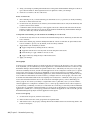
Install WiretapCentral on a dedicated system
Linux:
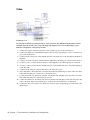
1 Prepare the installation media (page 31) in a terminal as root.
2 In the directory to which the files were unpacked, run the installer with the command INSTALL.
OS X:
1 Whether on the Smoke DVD or the DMG file, the WiretapCentral is found in the Standalone Installers
folder.
2 Run the app and follow the on-screen instructions to complete the installation.
WiretapCentral and Wiretap Gateway Installation | 137