1
On Pro Tools|HD systems, changing engines requires that you quit and relaunch Pro Tools for
the new setting to take effect.
When changing engines on any Pro Tools
system, you may need to reset the default
I/O settings to match the selected audio interface.
Pro Tools Aggregate I/O
(Mac Only)
On Mac systems using Core Audio, you can use
Pro Tools with the built-in audio inputs and
outputs on your Mac by selecting any of the
available built-in inputs and outputs, or by selecting the Pro Tools Aggregate I/O option for using a combination of built-in inputs and outputs simultaneously (for recording and
monitoring).
New Pro Tools Hardware
Settings
Pro Tools lets you configure the signal routing,
digital I/O format, default sample rate, clock
source, and other hardware-based settings depending on your system configuration. These
system settings are available in the Hardware
Setup (Setup > Hardware).
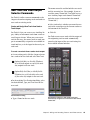
Pro Tools 9.0 lets you configure the hardware
settings for any audio interfaces associated with
the selected Current Engine setting in the Playback Engine dialog: Pro Tools|HD, Pro Tools,
M-Audio, or other third-party Core Audio (Mac)
or ASIO (Windows) audio interfaces connected
to your Pro Tools system.
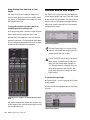
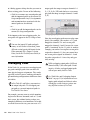
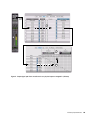
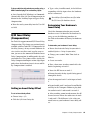
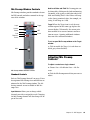
Hardware Setup for an ASIO device
Selecting Pro Tools Aggregate I/O in the Playback
Engine (Mac only)
You can configure the Input and Output options for Pro Tools Aggregate I/O in the Mac Audio Setup, which can be accessed from the
Pro Tools Hardware Setup (see “Configuring
Built-in or Pro Tools Aggregate I/O” on page 9).
If you need simultaneous input (recording)
and output (playback and monitoring) with
Pro Tools using the built-in audio options
on Mac, use the Pro Tools Aggregate I/O option. If you only need to playback audio for
editing and mixing, select the appropriate
built-in audio output option.
8
What’s New in Pro Tools 9.0
Selecting an Audio Interface to
Configure
The Peripherals list in the Hardware Setup lets
you select any audio interface connected to your
Pro Tools system associated with the selected
Current Engine setting in the Playback Engine dialog.
For Pro Tools|HD audio interfaces (such as
HD OMNI or HD I/O) you can configure the
signal routing, digital I/O format, default sample
rate, clock source, and other hardware-based
settings for each HD peripheral connected to
your system.