1
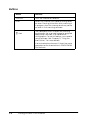
Where to Find Information
Setup Guide (this document)
Describes how to set up and use the scanner. Basic scanning
operations are covered. It also explains how to install and
configure the EPSON scanner software and options, and
describes how to make basic software settings and use the Start
Button function.
EPSON Scan Server & EPSON TWAIN Pro Network User's Guide
Provides detailed instructions for installing and using EPSON
Scan Server and EPSON TWAIN Pro Network software.
Online Reference Guide
Provides tips for optimizing scanning and detailed information
on the settings and functions of EPSON TWAIN Pro and EPSON
TWAIN Pro network. It also provides maintenance and
troubleshooting tips, technical specifications, and customer
support information.
Online Color Guide (may not be available in some countries)
Explains the basics of color imaging and how to get impressive
results from your scanner and other EPSON products.
Information on EPSON TWAIN Pro and EPSON TWAIN Pro Network
(online help)
Provides you with detailed information on EPSON TWAIN Pro
and EPSON TWAIN Pro Network. To display the online help,
click the Help button in the dialog box of EPSON TWAIN Pro or
EPSON TWAIN Pro Network.
Information on PageManager and other software
Refer to the respective documentation provided on the EPSON
Scanner Software CD-ROM or the other software CD-ROM.