1
Connection to an external ECG device, digitally controlled
(if terminal is used)
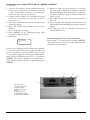
1. Connect the terminal via the supplied 0-modem
cable (9-pol. D-sub female connector on each end)
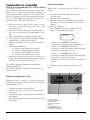
to the corresponding connector (5) in the front
end of the cycle, see Fig: Connections.
2. Connect the net adaptor to a suitable wall outlet
and to the connection (3) on the bike and then
turn power on.
3. After a short while the main menu is shown on the
terminal's display.
4. Press '99' and the service menu comes up on the
display.
5. Press ‘6’, for Service set-up.
6. Press ‘Enter’ on the following settings until
“Command type” is shown.
7. This says:
- 0 Terminal/PC
-1-3 see manual
- (0) _
8. Return to main menu by pressing '0' and then
press '0' again to finish. The computer will then
save the settings in the memory before it turns off.
Computer will start up again automatically after
a few seconds.
9. Turn off the power and remove the terminal incl.
the cable.
10.Use a suitable cable between an ECG device and
the bike (ECG Siemens Megacart requires a special
cable).
11.The bike can now be controlled only from an
external ECG device.
Reset the Ergometer to use with terminal/PC.
Follow steps 1-7. At step 7 press ‘0’ and then ‘Enter’.
The ergometer can now be controlled again from the
terminal or an external PC.
If a zero (0) is displayed at the 3rd line, the ergometer
is in normal mode which means that the bike can
not be controlled by an external ECG device. Press
'1' if a Siemens Megacart with Ergomed 940 will be
used. For use of other devices press '2' or '3' and then
‘ENTER’ (see section "Setting of command type").
Is the desired settings already in parenthesis press
‘Enter’.
2
3
4
5
1
6
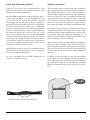
Fig: Connection
1) Printer connection
2) Power switch
3) Power connection
4) LED
5) Chassis ground
6) Terminal/PC (serial)
7) Analogue connection
10
7
Monark 839 E