1
2- and 4-Port ServSwitch DT Series USB/DVI/Audio KVM Switches
2.3 Components
2.3.1 KV9612A Front Panel
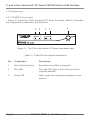
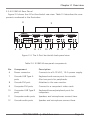
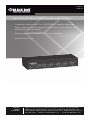
Figure 2-1 shows the 2-Port ServSwitch DT Series front view. Table 2-1 describes
the components numbered in the illustration.
3 2
3
2
1
Figure 2-1. The 2-Port ServSwitch DT Series front-panel view.
Table 2-1. KV9612A front panel components.
No. Component
Description
1
Port selection buttonPress button to select a computer.
2
Port LEDsThe right LEDs light to show the port that is
currently selected.
3
Power LEDLights when the connected computer is powered on.
Page 8
724-746-5500 | blackbox.com