1
Chapter 4: Operation
4.2 Hotkey Commands
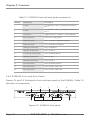
A Hotkey command is a short keyboard sequence used to select a computer,
activate a computer scan, etc. The KVM switch interprets keystrokes for hotkeys
all the time. A hotkey sequence starts with two left Ctrl keystrokes (successively in
0.2 seconds) followed by one or two more keystrokes. A built-in buzzer generates
a high-pitched beep for a correct hotkey command; otherwise, one low-pitched
beep is generated for error, and the bad key sequence will not be forwarded to
the selected computer.
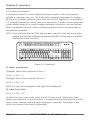
NOTE: Press and hold the Left Shift key and press the Num Lock key twice, then
release the Shift key followed by pressing the left Ctrl key once to enable/
disable the hotkey function.
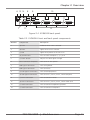
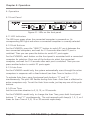
Figure 4-3. Keyboard.
To select a computer:
(Example: Selects the computer at Port 1.)
L-Ctrl + L-Ctrl + 1
(Example: Selects the computer at Port 2.)
L-Ctrl + L-Ctrl + 2
NOTE: Do not use the keypad at the right of the keyboard.
To start Auto Scan:
L-Ctrl + L-Ctrl + F1
To abort the Auto Scan mode, press the left Ctrl key twice. When Auto Scan
detects any keyboard or mouse activity, it suspends the scanning until the activity
stops; it then resumes with the next computer in sequence. The length of the
Auto Scan interval (Scan Rate) is adjustable.
Page 18
724-746-5500 | blackbox.com