1
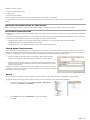
For complete details on the system requirements for VADP environments, see System Requirements - Virtual Server iDataAgent - VMware
ENVIRONMENTAL REQUIREMENTS
The vCenter server and all ESX Servers should be at vSphere 5.0, 5.1, 4.1 or 4.0 update 2 if possible. Should update 2 on 4.0 not be available, then a common
user must be created on the vCenter server and all ESX Servers to avoid vmx file download issues.
z
VMware ESX Server Level - ESX(i) servers must be at version 4 or above.
z
Disk Types - Independent disks and Physical RDM’s are not supported. Virtual RDM’s are supported.
z
Stand Alone ESXi - Stand-alone ESXi is not supported without the standard license level. License levels are explained in more detail in the following article.
http://blogs.vmware.com/esxi/2009/06/esxi-vs-esx-a-comparison-of-features.html
z
Fault Tolerant virtual machines - Fault Tolerant VMs are not supported for backup.
z
Duplicate Disk Names - Virtual machines with duplicate disk names may fail to back up due to a duplicate index entry.
z
Duplicate GUID - Virtual machines that have the same GUID may fail on restore.
PORT REQUIREMENTS
Prior to performing any backup or restore operations ensure the port requirements listed below are met.
VIRTUAL CENTER
z
Ports for web service (default: 443) and TCP/IP (default: 902) must be opened. Should vCenter be configured to use non-default ports these must be
opened.
ESX SERVER
z
Ports for web service (default: 443) and TCP/IP (default: 902) must be opened for the vStorage APIs for Data Protection.
CHANGE BLOCK TRACKING REQUIREMENTS
Change Block Tracking (CBT) must be enabled to support VADP backup. The Virtual Server iDataAgent agent will automatically check and enable CBT at the
time of backup. Virtual Server iDataAgent may not be able to enable CBT for cloned and migrated virtual machines. CBT can be checked by following the steps
documented in the following VMware article: http://kb.vmware.com/kb/1020128
VDDK INSTALLATION
The VDDK (Virtual Disk Development Kit) is now pushed with the installation of the Virtual Server iDataAgent. No separate installation is required.
USER PERMISSION REQUIREMENTS
A dedicated account can be used for performing backups on vCenter/ESX Server. The predefined VCB backup role can be copied and modified to perform VADP
Backups. This role will require several additional permissions which are listed below. This account only needs to be created in the event that a restricted
account is desired.
Restores are typically performed using the admin/root account. However a dedicated account can be created for this purpose. This account requires additional
permissions over the account used for backups.
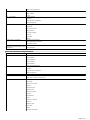
BACKUP PERMISSION REQUIREMENTS
Category
Available Permissions
Datastore
Allocate space
Browse datastore
Global
Low level file operations
Disable methods
Enable methods
Licenses
Virtual machine - Configuration
Add existing disk
Add new disk
Add or remove device
Change resource
Disk change tracking
Disk lease
Remove disk
Settings
Page 3 of 13