1
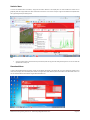
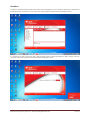
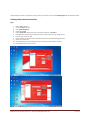
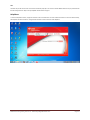
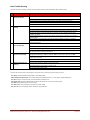
Statistics Menu To access the Statistics Menu Sub Feature, simply click the button Statistics on the Display Bar. This menu enables the modem user to graphically view their usage traffic trends when connected to the internet. You can also view your usage for both Downlink and Uplink traffic over a given daily, weekly or monthly period. Note: You can use other tools to view and measure your internet speeds at any given time during browsing session. You can use tools like speedtest.net or testmy.net. Phonebook Menu To access the Phonebook Menu Sub Feature, simply click the button Phonebook on the Display Bar. This menu enables the modem user to create, store, manage, search and delete phone contacts. The figure below shows different phone functionalities of the Phonebook menus. You can use all the Phonebook functionalities using the Phonebook Sub-Icons Mobile Internet Dongle User guide Ver 1.0 – Authored by Akugizibwe Simon Peter Page 11