1
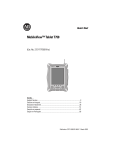
MobileView™ Tablet T750
3
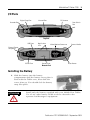
I/O Ports
Digital Gage Port
Infrared Port
RF Antenna
Barcode Port
Foot Switch
Port
Top End
USB Ports
External Power
Receptacle
RS-232 Port
Notification
LEDs
Video/Monitor Connector
Battery Pack
Bottom End
External Audio
Reset Button
Installing the Battery
1. Slide the battery into the battery
compartment until the battery cover plate is
flush with the Tablet case, then slide the
cover plate up. You should feel the battery
snap into place.
ATTENTION
Install only the battery supplied with your MobileView Tablet.
Use of any other battery could result in a hazard to the
operator and damage to equipment.
Publication 2727-QS004B-EN-P - September 2004