1
Dirac Theater Setup Guide
Version 1.01
Table of Contents
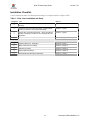
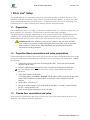
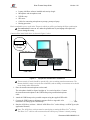
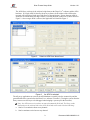
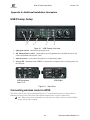
Limited Warranty .............................................................................................................................. iv Contact Information........................................................................................................................... iv Product Improvements and Upgrades................................................................................................ iv Introduction ........................................................................................................................................ v Installer’s Kit ...................................................................................................................................... v Portable computer requirements ........................................................................................................ vi Installation Checklist ........................................................................................................................ vii 1. DIRAC LIVE® SETUP............................................................................................................ 1 1.1. 1.2. 1.3. 1.4. 1.5. Preparation ....................................................................................................................... 1 Projection Room connections and setup preparations ..................................................... 1 Cinema floor connections and setup ................................................................................ 1 Starting Dirac Live Configuration software..................................................................... 4 Set sound levels to establish a baseline............................................................................ 4 2. DIRAC OPTIMIZATION......................................................................................................... 5 2.1. 2.2. 2.3. 2.4. 2.5. 2.6. Microphone placement – a discussion ............................................................................. 5 Configure the Dirac Live® application............................................................................ 7 Make Recordings ........................................................................................................... 12 Optimize the System ...................................................................................................... 14 Export the optimization.................................................................................................. 19 Final Sound Level Adjustments ..................................................................................... 21 APPENDIX A. ADDITIONAL INSTALLATION INFORMATION ................................................ 22 USB Preamp, Setup ................................................................................................................ 22 Connecting wireless router to AP20 ....................................................................................... 22 Loading the AP20 Proxy software and Dirac Live® software onto the laptop ....................... 23 Installing USB Preamp drivers ............................................................................................... 23 Windows 32 bit installation.............................................................................................................. 23 Windows 64 bit installation.............................................................................................................. 23 Microphone Calibration File................................................................................................... 23 iii
Document # 9301H40300V1.01