1
Printing
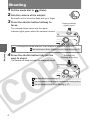
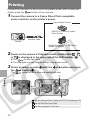
Connect the camera to a direct print compatible printer with a cable and
simply press the
button on the camera.
1 Connect the camera to a Canon Direct Print compatible
printer and turn on the printer's power.
Canon Brand Printers
SELPHY CP Series Compact
Photo Printers
Interface Cable
Camera
PIXMA Series/SELPHY DS Series
Bubble Jet Printers
2 Power on the camera in Playback mode. Confirm that
or
,
is displayed in the upper left of the LCD monitor (a).
z The
button lights blue.
z The displayed icon will vary according to the printer model.
3 Select an image to print (b) with the W or X button and press
the
button (c).
The
button will blink blue and printing will start.
a
b
Printing
c
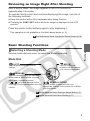
Î See the Advanced Guide: Setting the DPOF Print Settings (p. 65)
Î See the Direct Print User Guide
Î See the user guide for Your Printer
12