1
7
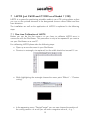
LAPOS (just C60III and C120III as of Model 11/08)
LAPOS is a system for positioning printable media in your CIII cutting plotter so that
you can cut the printed elements in the designated contour without offset and free
from distortion.
The installation as well as the application of LAPOS is explained in the following
steps.
7.1 One-time Calibration of LAPOS
Before you can do the first contour cut you have to calibrate LAPOS once in
connection with the FlexiStarter. This procedure is only to be repeated if you want to
use your FlexiStarter on a new PC.
For calibrating LAPOS please take the following steps:
• Open up a new document in your FlexiStarter.
• Construct a rectangle, size optional, but the width should not exceed 15 cm.
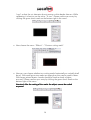
• While highlighting the rectangle choose the menu point “Effects“ – “Contour
cutting“.
• In the appearing menu “DesignCentral“ you can now choose the position of
the cutting contour. As a rule you will enter a negative value of , e. g. “15