1
CONTENTS
INTRODUCTION
GETTING STARTED
●
●
●
●
●
●
●
Conventions used in this
manual
In this manual, the following icons are used to
provide the user with information pertinent to the
use of the copier.
●
CAUTIONS . . . . . . . . . . . . . . . . . . . . . . . . . . . . . . . . . . . . . . 2
MAIN FEATURES . . . . . . . . . . . . . . . . . . . . . . . . . . . . . . . . 3
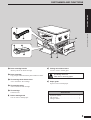
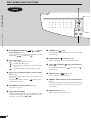
PART NAMES AND FUNCTIONS . . . . . . . . . . . . . . . . . . . . 4
– Overall layout . . . . . . . . . . . . . . . . . . . . . . . . . . . . . . . . . . . . . . . 4
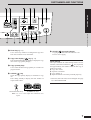
– Operation panel . . . . . . . . . . . . . . . . . . . . . . . . . . . . . . . . . . . . . 6
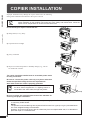
COPIER INSTALLATION . . . . . . . . . . . . . . . . . . . . . . . . . . 8
CAUTIONS ON HANDLING . . . . . . . . . . . . . . . . . . . . . . . . . 9
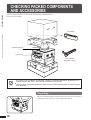
CHECKING PACKED COMPONENTS
AND ACCESSORIES . . . . . . . . . . . . . . . . . . . . . . . . . . . . . 10
SET-UP . . . . . . . . . . . . . . . . . . . . . . . . . . . . . . . . . . . . . . . . 11
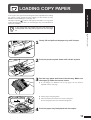
LOADING COPY PAPER . . . . . . . . . . . . . . . . . . . . . . 13
MAKING COPIES
●
●
NORMAL COPYING . . . . . . . . . . . . . . . . . . . . . . . . . . . . . .
REDUCTION/ENLARGEMENT/ZOOM . . . . . . . . . . . . . . .
BYPASS FEED (special paper) . . . . . . . . . . . . . . . . . . . .
TWO-SIDED COPYING . . . . . . . . . . . . . . . . . . . . . . . . . . .
INTERRUPTING A COPY RUN . . . . . . . . . . . . . . . . . . . . .
AUTOMATIC EXPOSURE ADJUSTMENT . . . . . . . . . . . .
TONER SAVE MODE . . . . . . . . . . . . . . . . . . . . . . . . . . . . .
●
Cautions the user that damage to the copier
or one of its components may result if the
contents of the caution are not properly
followed.
STATUS INDICATORS
●
●
●
●
●
●
GENERAL INFORMATION
●
●
●
●
●
●
USER PROGRAMS . . . . . . . . . . . . . . . . . . . . . . . . . . . . . .
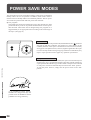
POWER SAVE MODES . . . . . . . . . . . . . . . . . . . . . . . . . . .
USER MAINTENANCE . . . . . . . . . . . . . . . . . . . . . . . . . . .
COPIER TROUBLE? . . . . . . . . . . . . . . . . . . . . . . . . . . . . .
SUPPLIES . . . . . . . . . . . . . . . . . . . . . . . . . . . . . . . . . . . . .
– Types and sizes of copy paper . . . . . . . . . . . . . . . . . . . . . . .
– Supply part numbers . . . . . . . . . . . . . . . . . . . . . . . . . . . . . .
– Genuine supplies statement . . . . . . . . . . . . . . . . . . . . . . . . .
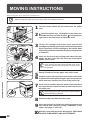
MOVING INSTRUCTIONS . . . . . . . . . . . . . . . . . . . . . . . . .
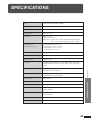
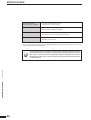
SPECIFICATIONS . . . . . . . . . . . . . . . . . . . . . . . . . . . . . . .
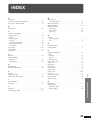
INDEX . . . . . . . . . . . . . . . . . . . . . . . . . . . . . . . . . . . . . . . . .
32
34
36
38
40
40
40
41
42
43
45
1
GENERAL INFORMATION
●
●
Indicates a letter displayed in the copy
quantity display.
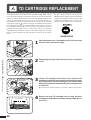
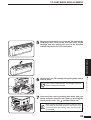
TD CARTRIDGE REPLACEMENT . . . . . . . . . . . . . . . 24
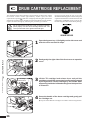
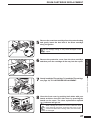
DRUM CARTRIDGE REPLACEMENT . . . . . . . . . . . . 26
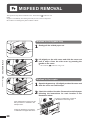
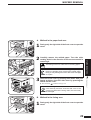
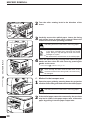
MISFEED REMOVAL . . . . . . . . . . . . . . . . . . . . . . . . . 28
STATUS INDICATORS
Warns the user that injury to the user or
damage to the copier may result if the
contents of the warning are not properly
followed.
15
17
18
20
21
22
23
MAKING COPIES
●
Notes provide information relevant to the
copier regarding specifications, functions,
performance, operation and such, that may
be useful to the user.
GETTING STARTED
This copier has been designed to provide
convenient copying features in a minimum
amount of office space and with maximum
operational ease. To get full use of all copier
features, be sure to familiarize yourself with this
manual and the copier.
For quick reference during copier use, keep this
manual in a handy location.
Page