1
Please refer to the MacBook Pro (Retina, Mid 2012) and MacBook Pro (Retina, 15-inch, Early 2013) service guide for the complete
set of detailed instructions, procedures and issues related to this product.
Technician Qualification
IMPORTANT
Only qualified technicians may perform repairs on the MacBook Pro (Retina, Mid 2012) and MacBook Pro (Retina, 15-inch, Early
2013).
Technician Qualification Process (Step 1 of 2)
1. Complete the following courses (found in the Service Training section of GSX):
Embedded Battery Safety self-paced training course
MacBook Pro (Retina, Mid 2012) and MacBook Pro (Retina, 15-inch, Early 2013) self-paced training course (This ONE course
covers both models)
Note: This course only contains battery safety reminders and product specific procedures. Be sure to review the Embedded Battery
Safety self-paced training course thoroughly.
Technician Qualification Process (Step 2 of 2)
2. Take the MacBook Pro (Retina, Mid 2012) and MacBook Pro (Retina, 15-inch, Early 2013) service qualification exam. (Passing
this one exam qualifies you to service both models)
Important: You must score 90% or higher in the Embedded Battery Safety section of the exam to pass. If you score lower than 90%
in this section, you will fail the whole exam regardless of your performance in other sections.
For more information about the MacBook Pro (Retina, Mid 2012) and MacBook Pro (Retina, 15-inch, Early 2013) service qualification
exam, please refer to GSX.
Battery Safety Reminders
The following safety precautions apply to the MacBook Pro (Retina, Mid 2012) and MacBook Pro (Retina, 15-inch, Early 2013) as
both contain an embedded (built-in) Lithium Polymer rechargeable battery pack.
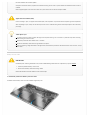
Perform all repairs in a designated area for Soft Cell Lithium Battery repairs.
Clear workspaces of foreign or sharp materials.
Do not expose the top case with battery to heat or open flame.
Do not drop, stack, puncture, crush, flex, apply unnecessary pressure to the battery or top case with battery.
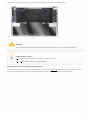
If the top case with battery is dropped, replace it.
Damage to a battery or top case with battery may result in a potential thermal event.
Review battery safety precautions, procedures and in-depth safety recommendations found in the Embedded Battery Safety selfpaced training (located in the service training section of GSX).