1
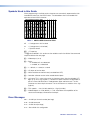
Symbols Used in this Guide
When programming in the field, certain characters are conveniently represented by their
hexadecimal rather than their ASCII values. The table below shows the hexadecimal
equivalent of each ASCII character:
ASCII to HEX Conversion Table
Space
.
Table 1. ASCII to HEX Conversion Table
] — Carriage return with line feed
} — Carriage return (no line feed)
•
— Space character
E — Escape key
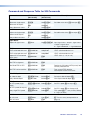
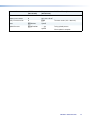
The X/ values defined in this section are the variables used in the fields of the command
response table on the next page.
X! — Video output (1 or 2)
X@ — Status
0 = disabled, off, or undetected
1 = enabled, on, or detected
X# — 1 = default; 2 = stored; 3 = extend
X$ — 256 bytes of raw hex data
X% — Native resolution and refresh rate (translated from HEX)
X^ — Controller software version to the second decimal place
X& — Unit name. This is a text string up to 24 characters drawn from the alphabet (A-Z),
digits (0-9), minus sign/hyphen (-). No blank or space characters are permitted as
part of a name. No distinction is made between upper and lower case. The first
character must be an alpha character. The last character must not be a minus sign
(hyphen).
X* — DDC speed: 1 = Low (20 kbits; default) 2 = High (100 kbits)
X( — Video bit depth: 0 = Auto (default) 1 = 8 bit. Auto follows the capabilities of the
source and the display connected to the output.
Error Messages
E01 — Invalid input channel number (too large)
E10 — Invalid command
E13 — Invalid value (too large)
E14 — Not valid for this configuration
DP DA2 • SIS Commands
15