1
Command
ASCII Command
(host to scaler)
Response
(scaler to host)
Additional Description
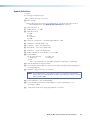
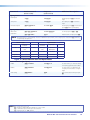
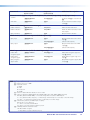
Audio Configuration
Audio mute (global setting)
Mute on
1Z
Amt1]
Mute audio output.
Mute off
0Z
Amt0]
Un-mute audio output.
View status
Z
X(]
View mute status.
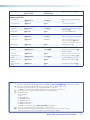
Audio gain and attenuation (per analog input)
Set gain/
attenuation
X3#G
AudX3#]
Set gain/attenuation on current input
to X3# dB.
Increment
+G
AudX3#]
Increment audio level (up).
Decrement
-G
AudX3#]
Decrement audio level (down).
View
G
X3#]
View current audio level.
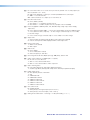
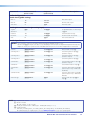
Audio input format
NOTES: • Selects between analog (3.5 mm TRS) or digital (embedded in HDMI input) audio sources.
• Inputs 1 and 2 X3$ can only be set to 0, 1, 2, or 3; attempting to set these inputs to a digital format yields an E14 response.
• Digital auto modes (6 or 7) detect and use embedded audio when present, or use TRS 3 if digital audio is not detected
Set None
EIX!*0AFMT}
AfmtIX!*0]
Mutes all audio for input X!.
Set Analog TRS 1
EIX!*1AFMT}
AfmtIX!*1]
Select analog audio for input X!
(default for input 1).
Set Analog TRS 2
EIX!*2AFMT}
AfmtIX!*2]
Select analog audio for input X!
(default for input 2).
Set Analog TRS 3
EIX!*3AFMT}
AfmtIX!*3]
Select analog audio for input X!.
Set LPCM-2Ch
EIX!*4AFMT}
AfmtIX!*4]
Select LPCM-2Ch audio for input X!
(default for input 3).
Set Multi-Ch
EIX!*5AFMT}
AfmtIX!*5]
Select Multi-Ch audio for input X!.
Set LPCM-2Ch
Auto
EIX!*6AFMT}
AfmtIX!*6]
Select auto detect audio for input X!
(valid for input 3 only — EDID set to
LPCM-2Ch).
Set Multi-Ch Auto
EIX!*7AFMT}
AfmtIX!*7]
Select auto detect audio for input X!
(valid for inputs 3 only — EDID set to
Multi-Ch).
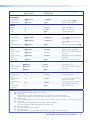
View audio type
EIX!AFMT}
X3$]
View the audio input type X3$ for
input X!.
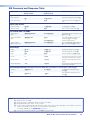
NOTE:
X! = Input selection: 1 to 3
X( = Enable or disable:
0 = Off or disable, 1 = On or enable
X3# = Audio gain and attenuation: -18 through + 12 dB, (with leading “+” or “–“)
X3$ = Audio Input type:
0 = None, 1 = Analog TRS 1, 2 = Analog TRS 2, 3 = Analog TRS 3, 4 = LPCM-2Ch, 5 = Multi-Ch,
6 = LPCM-2Ch Auto, 7 = Multi-Ch Auto. See the command description on page 25 for variable details.
DSC 301 HD • SIS Communication and Control
32