1
XTEND 900 MHZ WIRELESS MODEM
For use with VEEDER-ROOT EMR³ DATALINK
INSTALLATION INSTRUCTIONS
Manual 577013-859, Rev. B
INDIVIDUAL MODEM UNIQUE ADDRESS - IMPORTANT
Each Modem has a Unique Address assigned by Veeder-Root. This number is on the label on
the Modem Itself, and on the Modem Box. For each Truck / Interconnect Box, this number is
your traceability from the Specific Truck to the Office Software. The Truck Modem number will
be entered into the Office Software and identified with the specific Truck Number (or other local
identification).
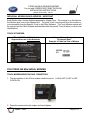
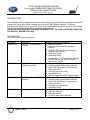
TRUCK KIT MODEM:
XTend 900 MHz, 1 Watt, Serial
Approved for use in the Americas
Unique Address Assigned
By Veeder-Root
Example of Label on Side of Modem
FOR XTEND 900 MHz SERIAL MODEMS
TRUCK MODEM MOUNTING AND CONNECTION:
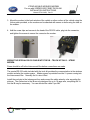
1. The dip switches on the XTend modem should be set to: 1=ON 2=OFF 3=OFF 4=OFF
5=ON 6=ON
2. Screw the antenna into the modem and hand tighten.
Veeder - Root
Page 2 of 13