1
1. Introduction
1.1 Safety Information
•
Before setting up the DVR, carefully read all the documentation that came with your package.
•
To prevent fire and shock hazard, never expose the DVR to rain or moisture.
•
If the power supply is broken, do not try to fix it by yourself. Contact a qualified service
technician or your retailer.
•
Before using the product, make sure all cables are correctly connected and the power cables
are not damaged. If you detect any damage, contact your dealer immediately
•
The DVR should be operated only by the type of power source indicated on the label. If you
are not sure of the type of power supplied to your home or office, consult your dealer or the
local power company
1.2 Contents of the box
1.
2.
3.
4.
5.
6.
DVR device
Quick Start Guide
CD
Remote Control
Power and Power cord
Mouse
1.3 Hard disk installation
Before the first use,please install the hard disk.
Before you can record onto your HDD it should be formatted by the DVR system,
because standard PC formatting is not compatible. The format process can take several
minutes.
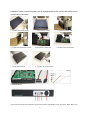
Your HDD should be installed inside the DVR. Please connect the(Hard Disk (HDD) in the following
way. Screw the HDD into the HDD brackets or DVR base. All necessary cables are included in the
package with the DVR. Use the instructions that came with the hard drive for exact wiring and
2