1
Carl Zeiss
3.1.3
START-UP
Installing standard components
Axio Lab.A1
Attaching the binocular tube/photo tube
All binocular tubes listed in the system overview (refer to Section 2.2) can be mounted on the microscope
stand as described below. Regardless of the stand type and tube used, in some cases an intermediate
plate must also be mounted (see Section 2.2).
For tubes mounted without an intermediate plate, proceed as follows:
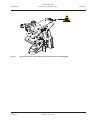
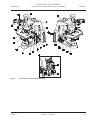
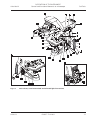
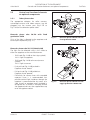
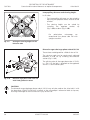
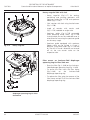
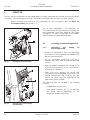
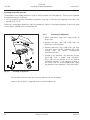
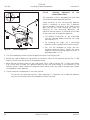
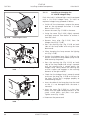
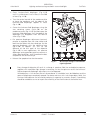
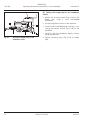
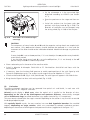
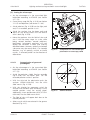
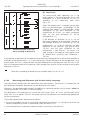
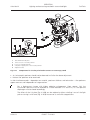
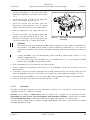
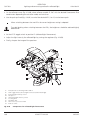
x Loosen the hexagonal socket head screw (Fig. 3-5/3) with a SW 3 socket wrench. Remove dust caps
(Fig. 3-5/2, 5) from the underside of the tube and the dovetail ring mount on the stand side.
x Hold the binocular tube/photo tube (Fig. 3-5/1) at an angle, insert it with the dovetail ring into the
stand mount (Fig. 3-5/4) and turn into a horizontal position. Rotate the binocular tube into the desired
observation position and re-tighten the hexagonal socket head screw with the ball-headed
screwdriver.
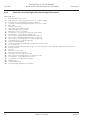
Fig. 3-5
Attaching the binocular tube
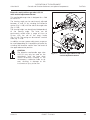
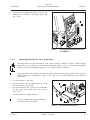
For tubes mounted with an intermediate plate, proceed as follows:
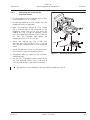
x Loosen the hexagonal socket head screw (Fig. 3-5/6) with a SW 3 socket wrench. Remove dust caps
(Fig. 3-5/8, 11) from the underside of the tube and the dovetail ring mount on the stand side.
x Insert the intermediate plate (Fig. 3-5/10) with its dovetail ring into the stand mount (Fig. 3-5/7) and
tighten hexagonal socket head screw (Fig. 3-5/6).
x Insert the binocular tube/photo tube (Fig. 3-5/12) into the intermediate plate, align and tighten the
hexagonal socket head screw (Fig. 3-5/9) with the ball-headed screwdriver.
48
430037-7144-001
04/2013