1
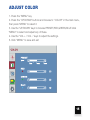
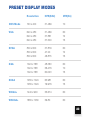
ADJUST COLOR
1. Press the “MENU” key
2. Press the “UP/DOWN” buttons and browse to “COLOR” in the main menu,
then press “MENU” to select it.
3. Use the “UP/DOWN” keys to browse PRESET,RED,GREEN,BLUE click
“MENU” to select and adjust any of these.
4. Use the “VOL + / VOL -” keys to adjust the settings.
5. Click “MENU” to save and exit
15