1
Contents
Outstanding Features ......................................................................................................................... 2
Accessories ........................................................................................................................................ 2
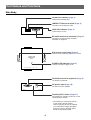
Part Names and Functions ................................................................................................................. 4
Main Body ................................................................................................................................ 4
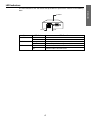
LED Indicators .......................................................................................................................... 5
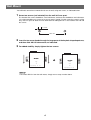
Wall Mount .......................................................................................................................................... 6
Connections
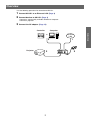
Overview ............................................................................................................................................ 7
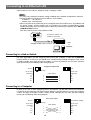
Connecting to an Ethernet LAN ......................................................................................................... 8
Connecting to a Hub or Switch ................................................................................................ 8
Connecting to a Computer ....................................................................................................... 8
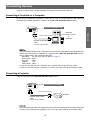
Connecting Devices ........................................................................................................................... 9
Connecting a Controller or a Computer ................................................................................... 9
Connecting a Projector ............................................................................................................ 9
Connecting the AC Adaptor .............................................................................................................. 10
Setup
Entering SETUP MENU .................................................................................................................... 11
When Connecting Using RS-232C .........................................................................................11
When Connecting Using Telnet .............................................................................................. 12
SETUP MENU Description ............................................................................................................... 13
SETUP MENU (Main Menu) .................................................................................................. 13
ADVANCED SETUP MENU ................................................................................................... 14
Basic Procedure ............................................................................................................................... 15
Setting of Each Item ......................................................................................................................... 18
Using the Software
About Sharp COM Redirection Software ......................................................................................... 25
Installation ........................................................................................................................................ 26
Starting ............................................................................................................................................. 29
Explanation of the Screen ................................................................................................................ 30
Operations ........................................................................................................................................ 31
Search and Add ...................................................................................................................... 31
Selecting Virtual COM Port .................................................................................................... 33
Add (Manual) .......................................................................................................................... 35
Refresh ................................................................................................................................... 37
Delete ..................................................................................................................................... 38
Password ............................................................................................................................... 40
Setting .................................................................................................................................... 42
OK/Cancel .............................................................................................................................. 43
Changing / Removing the Software ................................................................................................. 44
Appendix
Connecting Pin Assignments ........................................................................................................... 46
Troubleshooting ................................................................................................................................ 47
Specifications ................................................................................................................................... 52
Index ................................................................................................................................................. 53
3
Introduction
Introduction