1
5
Compiler Commands
• You cannot return back values from your standalone application to the user.
The only way to return values from compiled code is to either display it on
the screen or store it in a file. To display your data on the screen, you either
need to unsuppress (do not use semicolons) the commands whose results
yield data you want to return to the screen or, use the disp command to
display the value. You can then redirect these outputs to other applications
using output redirection (> operator) or pipes (only on UNIX systems).
Passing Arguments to a Double-Clickable Application
On Windows, if you want to run the standalone application by double-clicking
it, you can create a batch file that calls this standalone application with the
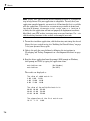
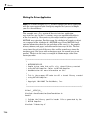
specified input arguments. Here is an example of the batch file:
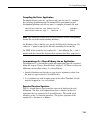
rem main.bat file that calls sub.exe with input parameters
sub "[1 2 3]" "[4 5 6]"
@echo off
pause
The last two lines of code keep your output on the screen until you press a
key. If you save this file as main.bat, you can run your code with the specified
arguments by double-clicking the main.bat icon.
Using Graphical Applications in Shared Library
Targets
When deploying a GUI as a shared library to a C/C++ application, use
mclWaitForFiguresToDie to display the GUI until it is explicitly terminated.
Using the VER Function in a Compiled MATLAB
Application
When you use the VER function in a compiled MATLAB application, it will
perform with the same functionality as if you had called it from MATLAB.
However, be aware that when using VER in a compiled MATLAB application,
only version information for toolboxes which the compiled application uses
will be displayed.
5-28