1
Basic adjustment settings
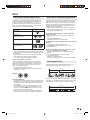
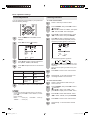
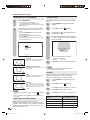
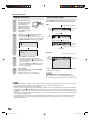
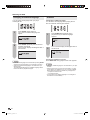
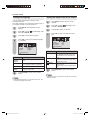
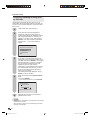
Color temperature
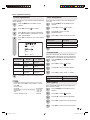
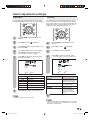
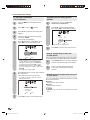
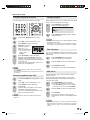
Picture adjustments
Adjusts the picture to your preference with the following
picture settings.
1
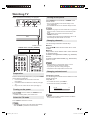
Press TV MENU and the MENU screen
displays.
2
Press
3
Press / to select a specific adjustment
item (BRIGHTNESS, CONTRAST, COLOR,
TINT, SHARPNESS).
4
Press
level.
/
/
(PICTURE).
to select
to adjust the item to the desired
PICTURE
AV MODE
STANDARD
BRIGHTNESS
CONTRAST
COLOR
TINT
SHARPNESS
25
40
25
0
25
:SELECT
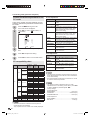
Selected item
BRIGHTNESS
CONTRAST
COLOR
TINT
SHARPNESS
5
button
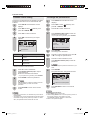
1
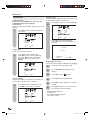
Press TV MENU and the MENU screen
displays.
2
Press
3
Press / to select “COLOR
TEMPERATURE”.
4
Press
/
/
to select
(PICTURE).
to select the mode you prefer.
Selected item
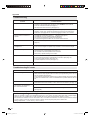
Description
COOL
MEDIUM
WARM
White with Blueish tone
Neutral
White with Reddish tone
5
Press EXIT to return to the normal screen.
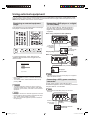
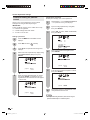
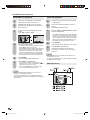
Cinema mode
:ADJUST
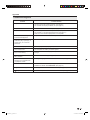
For less
brightness
For less contrast
For less color
intensity
Skin tones
become purplish
For less
sharpness
For a better white balance, use color temperature
correction.
A smoother motion may be obtained by setting the
CINEMA MODE to FILM when you view a DVD from
the DVD player connected with the component input.
button
For more
brightness
For more contrast
For more color
intensity
Skin tones
become greenish
For more
sharpness
Press EXIT to return to the normal screen.
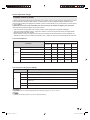
NOTE
• For resetting all Picture adjustment items to the factory
preset values, press / to select “RESET”, and then
press / .
Factory settings:
AV MODE.................................................... STANDARD
BRIGHTNESS / COLOR / SHARPNESS .... center (25)
CONTRAST ................................................ center (40)
TINT ............................................................ center (0)
COLOR TEMPERATURE ........................... MEDIUM
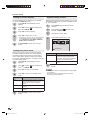
1
Press TV MENU and the MENU screen
displays.
2
Press
/
to select
3
Press
/
to select “CINEMA MODE”.
4
Press
/
to select “FILM” or “VIDEO”.
(SETUP).
Selected item
Description
FILM
VIDEO
Film content viewing mode
Video content viewing mode
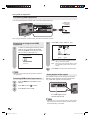
Back lighting
BACK LIGHTING adjusts the screen brightness for
improved picture clarity.
1
Press TV MENU and the MENU screen
displays.
2
Press
/
to select
3
Press
/
to select “BACK LIGHTING”.
4
Press
/
to adjust the screen brightness.
5
Press EXIT to return to the normal screen.
(SETUP).
17
5X20431A_E_.indb 17
5/19/2006 6:35:36 PM