1
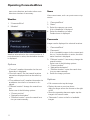
PhotoNav
When you take a photo using the GPS enabled camera on your phone, it captures
both the moment and your exact location, so that you can use your BMW Link to
navigate back there.
•
Take a photo with your phone’s GPS enabled camera.
When you take a photo, your phone uses GPS to record your exact position
and other geo tagged information which is stored with the photo.
Note: Follow the instructions that came with your phone.
•
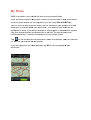
In the Go To menu, tap PhotoNav.
•
All your geo-tagged photographs will be shown in a list.
•
Tap a picture in the list.
BMW Link will display the location on a map together with the GPS
coordinates and a photo thumbnail.
•
Tap GO to begin navigating there.
Coordinates
Use coordinates to enter a specific location as a destination to find your way to any
place.
•
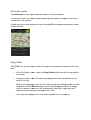
In the Go To menu, tap Coordinates.
•
You can enter a destination using coordinates in two ways:
Decimal Degrees
Ordnance Survey Grid
•
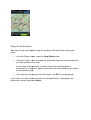
Enter the latitude and longitude values in the format that you are asked for
and then tap Next.
•
Tap GO to begin navigating there.