1
UX-470DE
FO-880DE/NX-670DE
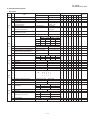
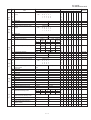
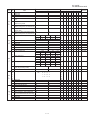
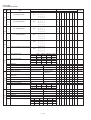
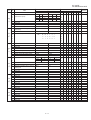
[2] Diagnostics and service soft switch
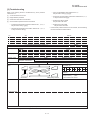
1. Operating procedure
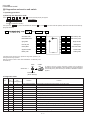
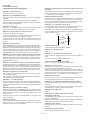
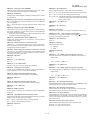
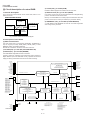
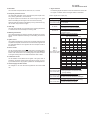
(1) Entering the diagnostic mode
Press FUNC → 9 →
→ 8 → # → 7 , and the following display will appear.
(FKX0 ) After 2 sec: DIAG MODE
ROM Ver. FKW0
FKW0 (UX-470DE)
FKX0 (FO-880DE/NX-670DE)
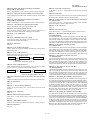
Then press the START key. Select the desired item with the
key or the # key or select with the rapid key. Enter the mode with the START key.
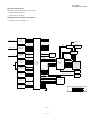
(Diag•specifications)
FUNC
9
8
FKW0
FKX0
7
DIAG MODE
START
Soft switch mode
START
1
—
START Flash memory clear
ROM & RAM check
START
2
—
START Flash memory check
Aging mode
START
3
—
START
Ring & Dial free
Panel key test
START
4
—
START
Message print
Check pattern
START
5
—
START
Auto feeder mode
Signal send mode
START
6
—
START
All black mode
Memory clear
START
7
8
START
Shading mode
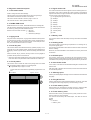
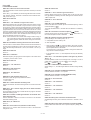
If the diag mode cannot be set, repeat the diag mode operation, performing the following operation.
After the power is turned on and "WAIT A MOMENT" is indicated, press
the STOP key.
START
KEY
STOP
KEY
"Power ON" +
In relation with the process response (request from Production
Engineering) "WAIT A MOMENT" clock indication may appear depending
on STOP key timing. If the STOP key is held down, "MEMORY CLEAR?"
appears.
Memory clear
(Work + Backup)
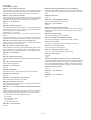
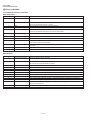
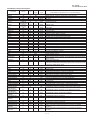
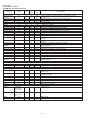
2. Diagnostic items
ITEM
No.
DIRECT
key
DIRECT
key
Contents
Function
(UX-470) (FO-880/NX-670)
1
1
1
SOFT SWITCH MODE
Soft switches are displayed and changed. List can be output.
2
2
2
ROM & RAM CHECK
ROM is sum-checked, and RAM is matched. Result list is output.
3
3
3
AGING MODE
10 sheets of check patterns are output every 5 minutes per sheet.
4
4
4
PANEL KEY TEST
Panel keys are tested. Result list is output.
5
5
5
CHECK PATTERN
Check pattern is output.
6
—
6
SIGNAL SEND MODE
Various signals of FAX communication are output.
7
—
7
MEMORY CLEAR
Back-up memory is cleared, and is set at delivery.
8
—
8
SHADING MODE
Shading compensation is performed in this mode.
9
—
—
ALL BLACK PRINT
To check the print head, whole dots are printed over the interval of 2 m.
10
—
—
AUTO FEEDER MODE
Insertion and discharge of document are tested.
11
—
—
MESSAGE PRINT
The display message of each language is printed out together with the English equivalent.
12
—
—
RING & DIAL FREE
Allows CI detection of 13Hz or more. Eliminates dial tone detection in auto dial.
13
—
—
FLASH MEMORY CHECK
Checks flash memory write/read.
14
—
—
FLASH MEMORY CLEAR
Checks flash memory clearing.
2–2