1
UX-258TH
FO-475TH
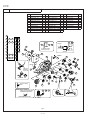
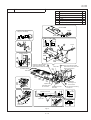
3-2. Automatic document feed
CHAPTER 3. MECHANISM BLOCKS
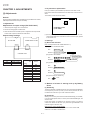
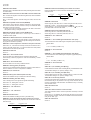
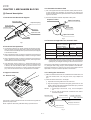
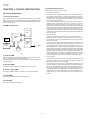
1) Use of the paper feed roller and separation rubber plate ensures error-free transport and separation of documents. The plate spring
presses the document to the paper feed roller to assure smooth feeding of the document.
[1] General description
2) Document separation method: Separation rubber plate
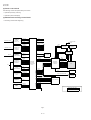
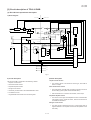
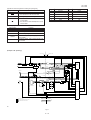
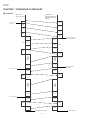
1. Document feed block and diagram
Separator rubber
Paper feed spring
Separator rubber
Paper feed spring
Rear roller A/B
Transfer roller
Document
Document
Paper feed roller
Paper feed roller
CIS
Pinch roller
Fig. 3
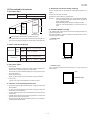
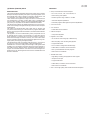
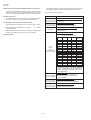
3-3. Documents applicable for automatic feed
Fig. 1
Square
meter series
4x6 series
(788mm x 1091mm x
1000mm sheets)
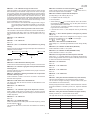
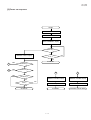
2. Document feed operation
Minimum
1) The document placed in the hopper actuates the document sensor.
After one second, the pulse motor starts to drive the paper feed roller.
The document is automatically taken up into the machine, and stopped
at the document sensor.
Feeder capacity
Paper weight
Maximum
Minimum
Maximum
52g/m2
74.3g/m2
10 sheets, max.
45kg
64.3kg
Paper thickness (ref.) 0.06mm
0.09mm
0.06mm
0.09mm
Paper size
1/2 Letter (148mm x 140mm) ~
A4 (210mm x 297mm), Letter (216mm x 279mm)
2) When a specified number of pulses are received from the document
sensor after the document lead edge is sensed, scanning is started.
3) When a specified number of pulses are received from the document
sensor after the document rear edge is sensed, scanning is terminated and the document is fed through.
NOTE: Double-side coated documents and documents on facsimile recording paper should be inserted manually. The document feed
quantity may be changed according to the document thickness.
4) If the document sensor is active (i.e., another document is in the
hopper), when the preceding document scanning is completed and it
is fed out, the next document is taken up into the machine. If the
document sensor is not active (i.e., there is no document in the hopper), when the document is fed out, the operation is terminated.
Documents corresponding to a paper weight heavier than 64.3kg (74.3g/
m2 ) and lighter than 135kg (157g/m2 ) are acceptable for manual feed.
Documents heavier than 135kg in terms of the paper weight must be
duplicated on a copier to make it operative in the facsimile.
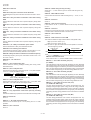
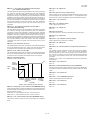
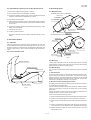
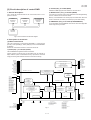
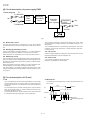
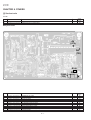
3. Hopper mechanism
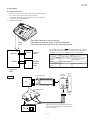
3-4. Loading the documents
3-1. General view
1) Make sure that the documents are of suitable size and thickness, and
free from creases, folds, curls, wet glue, wet ink, clips, staples and
pins.
2) Place documents face down in the hopper.
i) Adjust the document guides to the document size.
ii) Align the top edge of documents and gently place them into the
hopper. The first page under the stack will be taken up by the feed
roller to get ready for transmission.
NOTES: 1) Curled edge of documents, if any, must be straighten
out.
2) Do not load the documents of different sizes and/or
thicknesses together.
Separator rubber
Paper feed spring
Fig. 2
Last page of document
Back of document
The hopper is used to align documents with the document guides adjusted to the paper width.
NOTE: Adjust the document guide after setting up the document.
First page of document
Paper feed roller
Fig. 4
3–1